TickTick Review for ADHD: Is this really Good?

I've opened TickTick on a bad morning, stared at 23 overdue tasks, and closed it again. I've also used it to run 2 weeks of my life without dropping anything important. Same app. Different setup.

TickTick is one of the best-value task managers for ADHD, but out of the box it's a filing cabinet with alarms. Set it up badly and it becomes a very polished guilt machine. Set it up well and it covers capture, reminders, a focus timer and habits in one place, for less than a monthly takeaway coffee habit.
In this post: what TickTick does well for ADHD, where it falls down, who should skip it, and the exact setup I'd use if I were starting from zero today.
Quick answer: is TickTick good for ADHD?
Yes, for most adults with ADHD who need fast capture and loud reminders, TickTick is a strong and cheap choice. No, if you need an app that plans your day for you.
- Best at: getting a task out of your head in about three seconds, nagging you until you deal with it, and keeping tasks, a Pomodoro timer and habits in one app.
- Weak at: telling you what to do next. It stores your list. It doesn't sequence it.
- Price: free plan available. Premium is $49.99/year or $4.99/month on the US App Store (checked September 30, 2026).
- Skip it if: busy screens overwhelm you, or you've abandoned many list apps because the list kept growing.
What is TickTick?
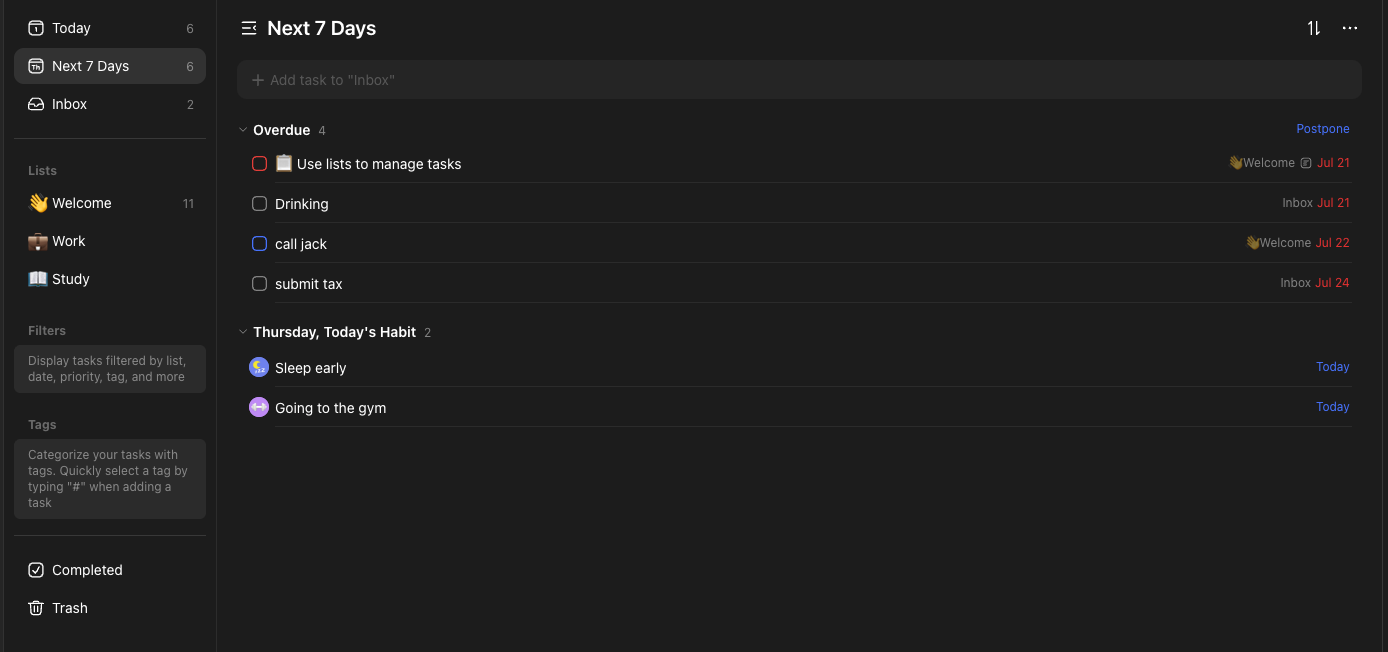
TickTick is a cross-platform to-do list and calendar app (iOS, Android, Mac, Windows, web). Think of it as Todoist's cousin who also owns a gym membership and a kitchen timer. Next to tasks and projects, it bundles:
- A calendar with day, week and month views (the grid view is Premium)
- A built-in focus timer (Pomodoro-style, plus a stopwatch mode)
- A habit tracker
- An Eisenhower Matrix view for sorting urgent vs important
- Natural-language quick add ("pay rent Friday 9am" becomes a dated task with a reminder)
- As of September 2026, it says it can create tasks and break down projects from a single instruction
What TickTick does well for ADHD
Capture is fast enough
The window between "I should email Dana" and forgetting Dana exists is roughly the length of a sneeze. TickTick's quick add, home-screen widgets and natural-language dates close that window. Type "call vet tomorrow 4pm" and you get a dated task with a reminder, no menus. The mobile app also supports voice input

For ADHD this is the feature that matters most. An app you can't capture into in under five seconds becomes an app you don't use.
Reminders you can hear
Premium gives you up to five reminders per task. That sounds excessive until you remember that the first reminder usually arrives while you're mid-conversation, the second while you're in the shower, and the third is the one you act on. On Android there's also a persistent "annoying alert" style that keeps going until you respond.
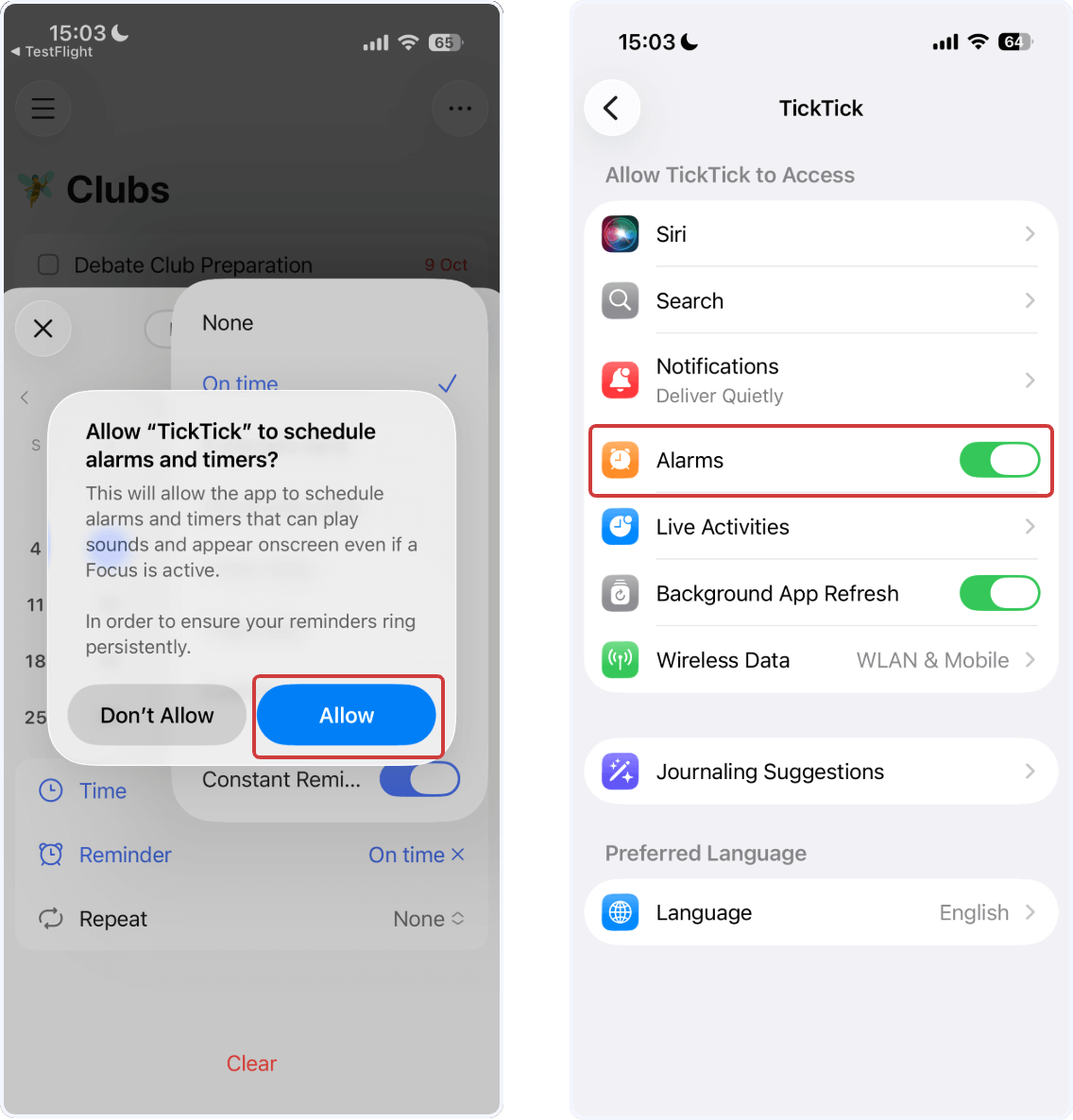
Use this sparingly. If everything nags, nothing nags.
Focus timer and habits live next to your tasks
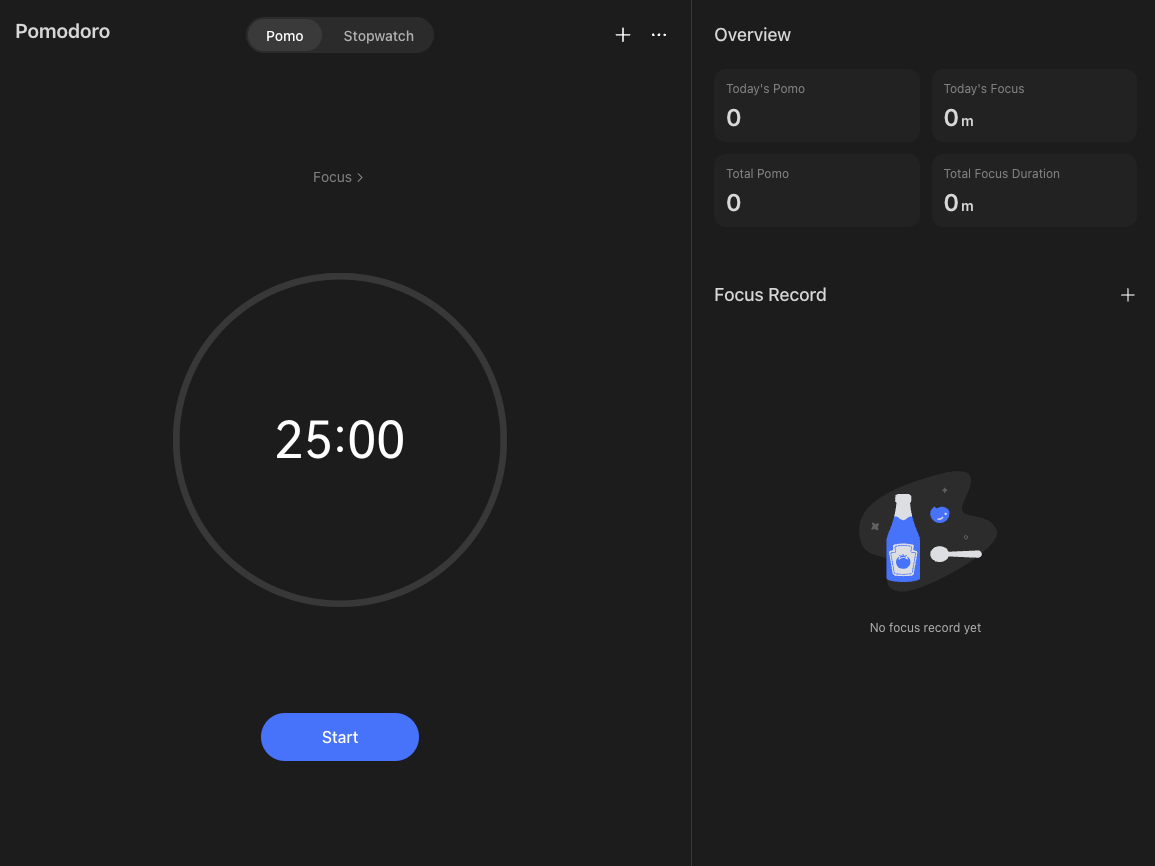
TickTick's focus timer lets you start a Pomodoro directly from a task, and it logs the time against that task. If Pomodoro works for your ADHD brain, having it one tap away removes the "I'll just find my timer app" detour that somehow ends on YouTube.
The habit tracker is basic but fine.
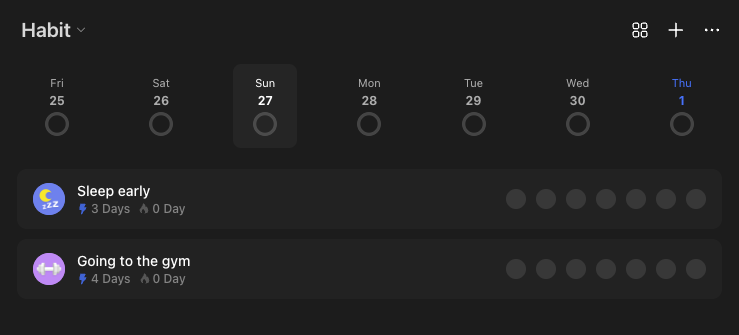
>> If habits are your main goal, a dedicated app from our ADHD habit tracker roundup will be friendlier.
If you just want "take meds" and "water plants" to live in the same place as your tasks, TickTick's version does the job.
The Eisenhower Matrix gives you a second way to see your list
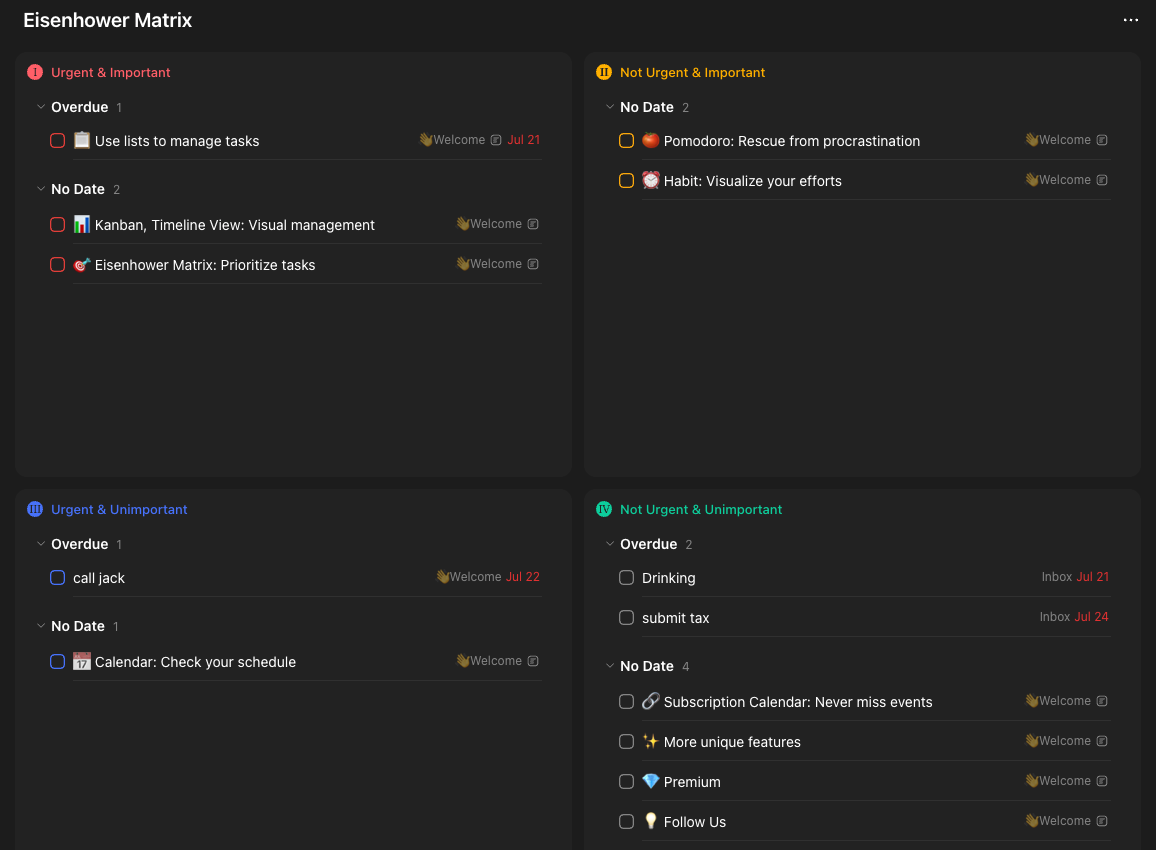
A long list is a wall. The Matrix view splits it into four boxes by urgency and importance, which is a gentler way to answer "what now?" when the list feels flat.
>> It's no substitute for the judgment calls in our guide to prioritizing tasks with ADHD, but it helps.
Price
At $49.99 a year, Premium costs a fraction of AI planners. For a lot of people with ADHD, the ADHD tax of paying for three abandoned subscriptions is real, so a cheap app you can keep is worth more than a brilliant one you cancel next 2 months.
Where TickTick falls short for ADHD
It doesn't decide for you
This is the big one. TickTick will hold 200 tasks without complaint. It will not look at them and say "do these three today." On a low-executive-function morning, an undifferentiated list is close to useless.
>> If that describes you, look at planner-style tools like Saner.AI or the AI options in our ADHD task management apps comparison.
The new AI Assistant helps with breaking a vague project into steps. It doesn't yet replace a daily planning ritual.
The interface is busy
Tabs for tasks, calendar, matrix, focus, habits, search, countdowns, settings. For some ADHD brains that's a toy box. For others it's a room with too many doors. You can hide most tabs in settings
Overdue tasks pile up quietly
TickTick doesn't auto-reschedule. Miss a day and yesterday's tasks turn red and wait for you. Miss a week and you open the app to a crime scene. You need a weekly reset habit or the app turns into a museum of good intentions.
No time-blocking engine
You can drag tasks onto the calendar, and Premium can subscribe to your Google, Outlook or iCloud calendars. But it won't build a schedule around your meetings the way an AI calendar for ADHD does.
TickTick vs other ADHD task apps
| App | Best for | Plans your day? | Price (approx.) | ADHD watch-out |
|---|---|---|---|---|
| TickTick | Fast capture + reminders + timer in one app | No | Free / $49.99 yr | Lists grow unchecked |
| Todoist | Clean lists, strong integrations | No | Free / paid tiers | Calendar and reminders less bundled |
| Amazing Marvin | People who like to tinker | Partly, via strategies | Paid | Customizing becomes the procrastination |
| Sunsama | Guided daily planning | Yes, with you | ~$17–22/mo | Cost |
| Motion | Auto-scheduling | Yes, automatically | ~$49/mo | Packs days too tight by default |
| Saner.ai | Capture from notes/email, AI day plan | Yes, proposes one | See saner.ai | Newer, fewer power features |
Prices change; check each app's store listing before buying.
When a planner beats a list
If your problem is "I know what to do but can't start," TickTick is fine. If your problem is "I have no idea what to do first," a list app, any list app, is the wrong shape.
This is where I'd point you at Saner.ai. Saner pulls tasks out of notes and email and proposes a plan for the day, which is the gap TickTick leaves open.
TickTick vs Todoist for ADHD
Pick TickTick if you want reminders, a timer and habits bundled, and you don't mind a busier screen. Pick Todoist if a calmer interface matters more than features.
How to set up TickTick for ADHD: a 20-minute setup
Step 1: Hide what you won't use (3 minutes)
Settings → Tab Bar. Keep Tasks, Calendar, Focus. Add Habits only if you'll actually track habits. Hide Matrix until week two. Fewer doors, fewer detours.
Step 2: Create only four lists (3 minutes)
- Inbox (everything lands here)
- Today-ish (things that matter this week)
- Someday (ideas you're not ready to delete)
- Life admin (bills, forms, appointments)
That's it. You can add project lists later. Starting with 14 lists is how the app becomes a hobby.
Step 3: Write tasks as "when-then" actions (ongoing)
"Taxes" is a cloud. "When I sit down after dinner Monday, then I open the IRS login page" is a task. If-then planning, also called implementation intentions, has lab evidence behind it: in a study by Gawrilow and Gollwitzer, children with ADHD who added if-then plans to a goal improved response inhibition on the test task.
>> If a task still feels too big, use AI to break it down into the first physical step.
Step 4: Set reminders on purpose, not by default (5 minutes)
- Give time-bound tasks (appointments, bills) two reminders: one the day before, one an hour before.
- Give everything else no reminder. It lives in Today-ish and you see it during your daily check.
- Turn on the persistent alert only for the stuff with real consequences: meds, school pickup, flights.
Step 5: Build one smart list called "Next 3" (4 minutes)
Premium lets you create custom smart lists (filters). Make one that shows Today-ish tasks with high priority, sorted by due date, and look only at the top three. Your brain gets a short list; the long list still exists, just out of sight.
Step 6: Pair the focus timer with estimates (2 minutes)
When you start a focus session from a task, TickTick records the time spent. After a week, compare what you guessed with what it took.
>> If you live with ADHD time blindness, this is the cheapest reality check you'll ever get.
Mine said "15 minutes" to things that took 50.
Step 7: Schedule a 10-minute Sunday reset (recurring)
Make a recurring task: "Sunday 6pm: clear overdue." Rules for the reset:
- Anything overdue more than a week goes to Someday or gets deleted. No guilt.
- Pick three tasks for Monday.
- Empty the Inbox into the four lists.
>> If you want a fuller version of this, our guide on planning a week with ADHD walks through it.
Who should use TickTick (and who shouldn't)
Good fit if you:
- Forget things mainly because you never wrote them down
- Need reminders that actually interrupt you
- Like having a timer and habits in the same app
- Want something cheap that works on every device you own
Poor fit if you:
- Freeze when you see a long list, and need an app to choose for you
- Get overwhelmed by busy interfaces
- Have abandoned several list apps for the same reason (a new list app won't fix a list-shaped problem)
- Want your calendar built automatically around meetings
My verdict
TickTick is the app I recommend to people with ADHD who are starting from nothing and don't want to spend much. It's cheap, fast and covers more ground than anything at its price.
Its weakness is also clear: it assumes you'll decide what to do next. If you can do that on most days, TickTick with the setup above is plenty. If you can't, pair it with a planner or pick one that does the deciding.
Rating for ADHD: 4/5. Great capture and reminders, weak on planning.

How you can start with TickTick today
- Today: install the free version and do Steps 1 and 2 (six minutes).
- Tomorrow: move everything from your head, sticky notes and random notes app into the Inbox. Don't organize yet.
- Day 3: rewrite your top five tasks as when-then actions.
- Day 4 to 7: use the focus timer on two tasks a day and note the estimate gap.
- Sunday: do the 10-minute reset. Then decide whether Premium's extra reminders and smart lists are worth $49.99 to you.
FAQ
Is TickTick good for ADHD?
For most adults with ADHD, yes. Its fast capture, multiple reminders per task, built-in focus timer and habit tracker cover the most common failure points. Its main weakness is that it doesn't plan your day or sequence your tasks, so people who freeze at long lists may do better with a planner app.
Is TickTick free?
TickTick has a free plan with limits on lists and reminders. Premium costs $49.99 per year or $4.99 per month on the US App Store as of September 2026, and it unlocks up to 299 lists, five reminders per task, the grid calendar view and custom smart lists.
How do I stop my TickTick list from getting overwhelming?
Keep four lists, create one smart list that shows only your top three tasks, and run a 10-minute weekly reset where anything overdue by more than a week moves to Someday or gets deleted.
Does TickTick have AI features?
Yes. As of September 2026 TickTick includes an AI Assistant that can create tasks and break projects into steps from a single instruction, plus AI voice input on mobile. It still doesn't auto-schedule your day.
Can an app treat ADHD?
No. Reviews of ADHD apps find limited, short-term evidence, and general productivity apps like TickTick haven't been studied as ADHD treatments. Use them as practical tools alongside whatever care works for you, and talk to a clinician about treatment.