The 5 Best Planner Apps for ADHD Adults

I have ADHD. I also coach knowledge workers and freelancers who do. Between my own daily chaos and watching clients burn through app after app, I’ve seen up close what actually works and what just looks good in a demo.
Most ADHD planner roundups are written by people who downloaded five apps in a weekend and called it “testing.” This one isn’t. Every tool on this list was used for at least 30 days in real work situations - not staged productivity sessions.
This post is for adults with ADHD (diagnosed or suspected) who are tired of starting over. If you’re a freelancer, remote worker, student, or anyone whose job involves juggling multiple projects without a manager watching over you, this is written for you.
Quick answer: What are the best ADHD planner apps right now?
If you don’t have time to read the full breakdown, here’s the short version:
- Saner.AI — Best for knowledge workers with ADHD who lose track of information across apps. Combines AI task management, note capture, email, and calendar in one place. Free plan available; paid from $8/month.
- Tiimo — Best for visual learners and anyone whose main struggle is time blindness. Won Apple’s iPhone App of the Year 2025. Free tier available; Premium from ~$10/month.
- Sunsama — Best for professionals who need a forced daily planning ritual to stay realistic about workload. No free plan; $16/month billed annually.
- Amazing Marvin — Best for ADHD power users who’ve tried everything else and want a fully customizable system. 14-day free trial; $8/month billed annually.
- Structured — Best for visual day planning on Apple devices. Makes time tangible with a color-coded timeline. Free tier available; Pro from ~$5/month.
What is an ADHD planner?
An ADHD planner is a digital planning tool designed to work with how ADHD brains actually function. That means features that reduce cognitive load instead of adding it.
Why ADHD makes planning so hard

ADHD affects more adults than most people realize.
- A landmark 2024 meta-analysis published in The Lancet Psychiatry estimates that symptomatic adult ADHD affects approximately 366 million adults worldwide — around 6.76% of the global adult population.
The productivity hit is real and measurable.
- Adults with ADHD lose an average of 21.6 more days of productive work per year than their non-ADHD peers — a figure driven by inattention, disorganization, and executive dysfunction, not laziness. (Source: Journal of Managed Care & Specialty Pharmacy, 2021; Huntington Psychological Services, 2025)
Time blindness isn’t a mindset problem.
- The core challenge isn’t motivation. It’s neurology. Adults with ADHD show reduced activation in the prefrontal cortex - the part of the brain that manages planning, prioritization, and the internal sense of time.
- A 2024 peer-reviewed study by Turjeman-Levi et al. found that poor time management and disorganization specifically mediated the link between ADHD and job burnout — meaning it wasn’t stress or workload alone, but the executive function deficits underneath them. (Source: Psychology Today; OccupationalTherapy.com; Medium, Dr. Cristina Louk, February 2026)
How we chose these apps
I tested over a dozen ADHD planner apps across a 90-day period, using each one as my primary planning system for at least 30 days. Apps were evaluated on the following criteria:
- Low friction to start — Does it require a 45-minute setup before you can plan your first day? ADHD brains abandon high-friction onboarding fast.
- Time awareness support — Does the app make time visible, not just listed? Does it address time blindness with visual countdowns, timelines, or time-blocking?
- Cognitive load reduction — Does it reduce the number of decisions you need to make, or does it create more?
- Forgiveness and flexibility — What happens when you miss a day or fall off the system? Apps that punish inconsistency are a poor fit for ADHD.
- Real-world integration — Does it connect with the tools you already use (email, calendar, notes), or does it require you to live inside a separate ecosystem?
- Pricing transparency — Is the free tier actually usable, or just a teaser? Is the paid plan sustainable for someone on a tight budget?
Now, let’s dive in!
1. Saner.AI - Best for ADHD knowledge workers
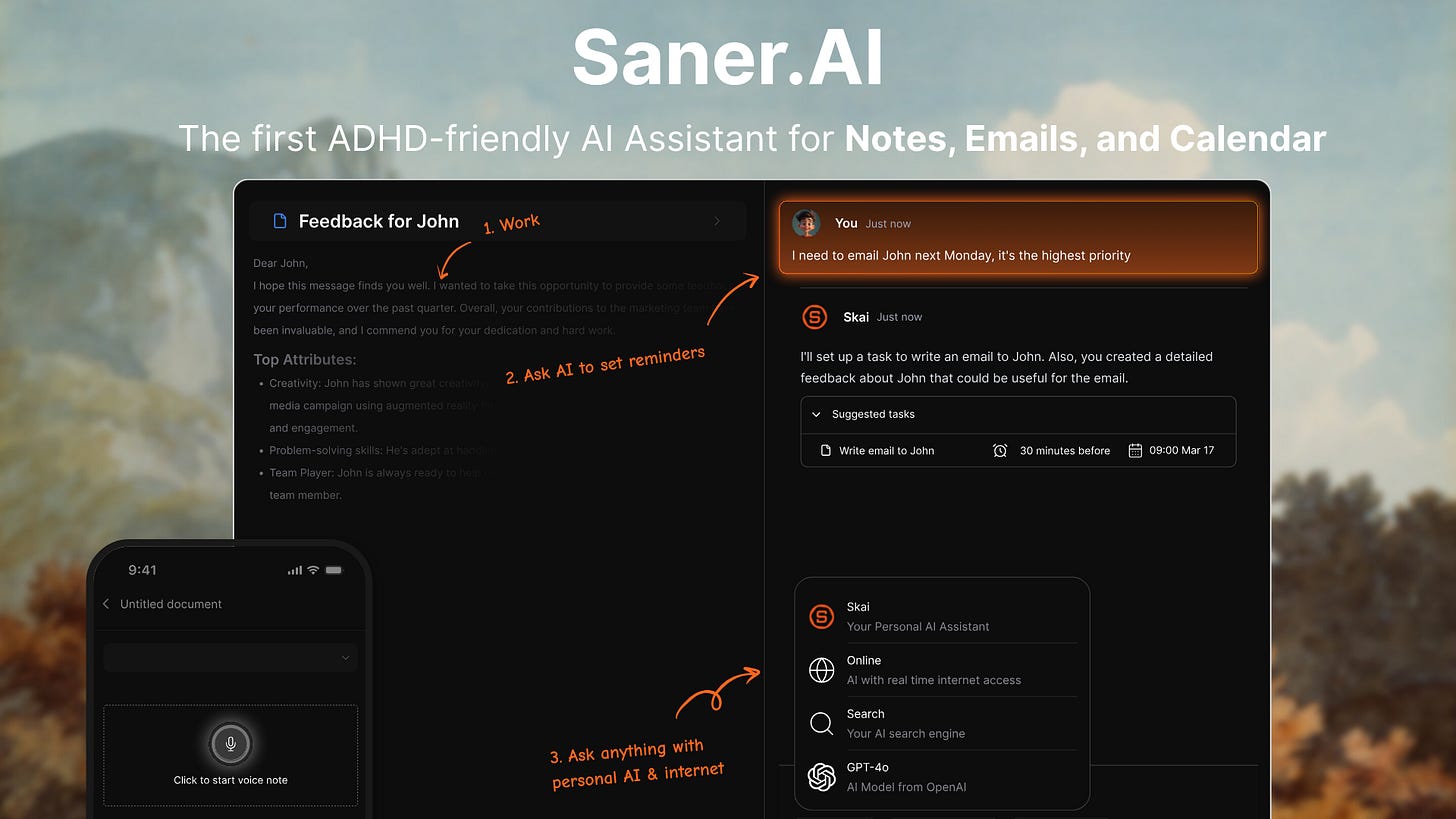
Saner.AI is an AI ADHD planner, it captures and connects the information your ADHD brain keeps losing. It pulls your notes, email, calendar, and documents into one place and gives you an AI assistant named Skai that actually helps you figure out what to do next.
For people with ADHD who work across multiple projects and spend half their day hunting for things they saved somewhere, this is a meaningful gap to fill.
Key features:
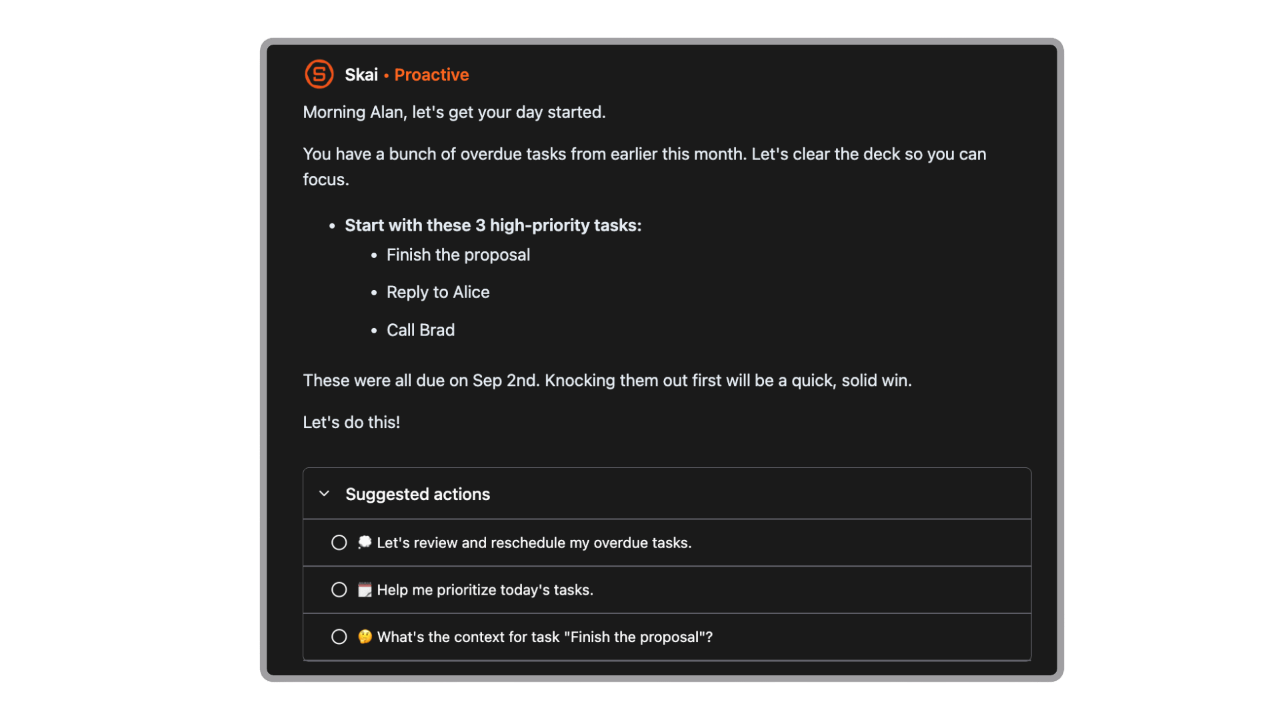
- AI daily planner (Skai): Scans your notes, tasks, and calendar each morning and generates a suggested plan for the day. You don’t have to stare at a blank page deciding where to start.
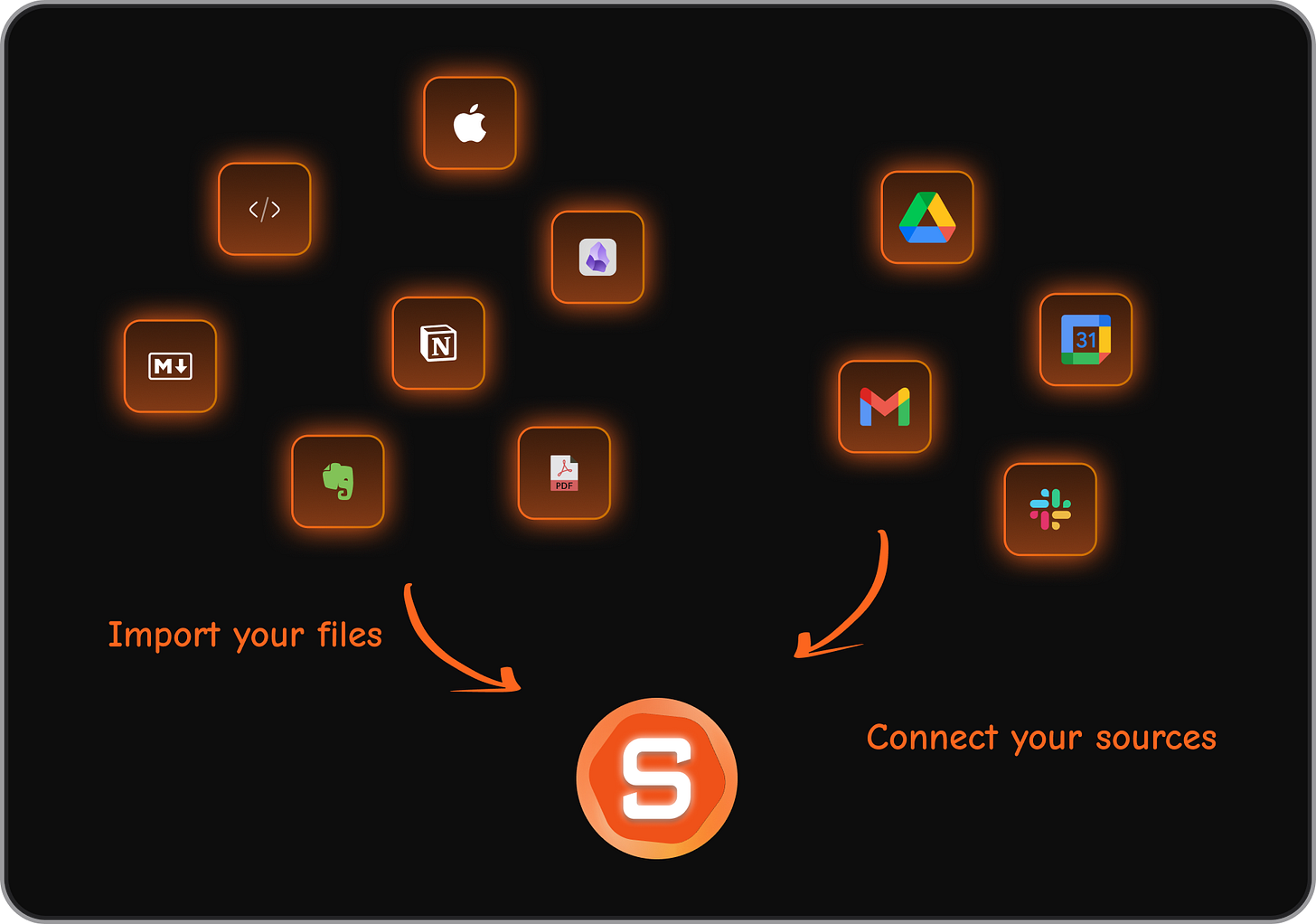
- Unified capture (notes + email + calendar): One place for everything means fewer tabs, less switching, and a lower chance of losing a critical thought to the void.
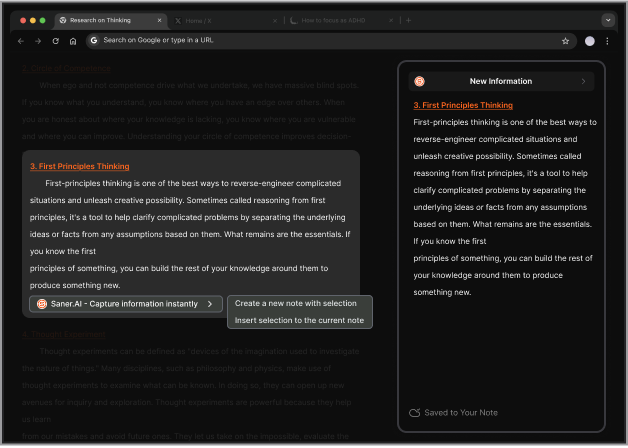
- Chrome extension for quick capture: Save anything from the browser directly into Saner without switching apps. Particularly useful for ADHD brains who hyperfocus on research and then lose track of what they found.
Semantic search: Ask Skai a question in plain language and it searches across all your notes and documents to find the answer. No need to remember where you filed something.
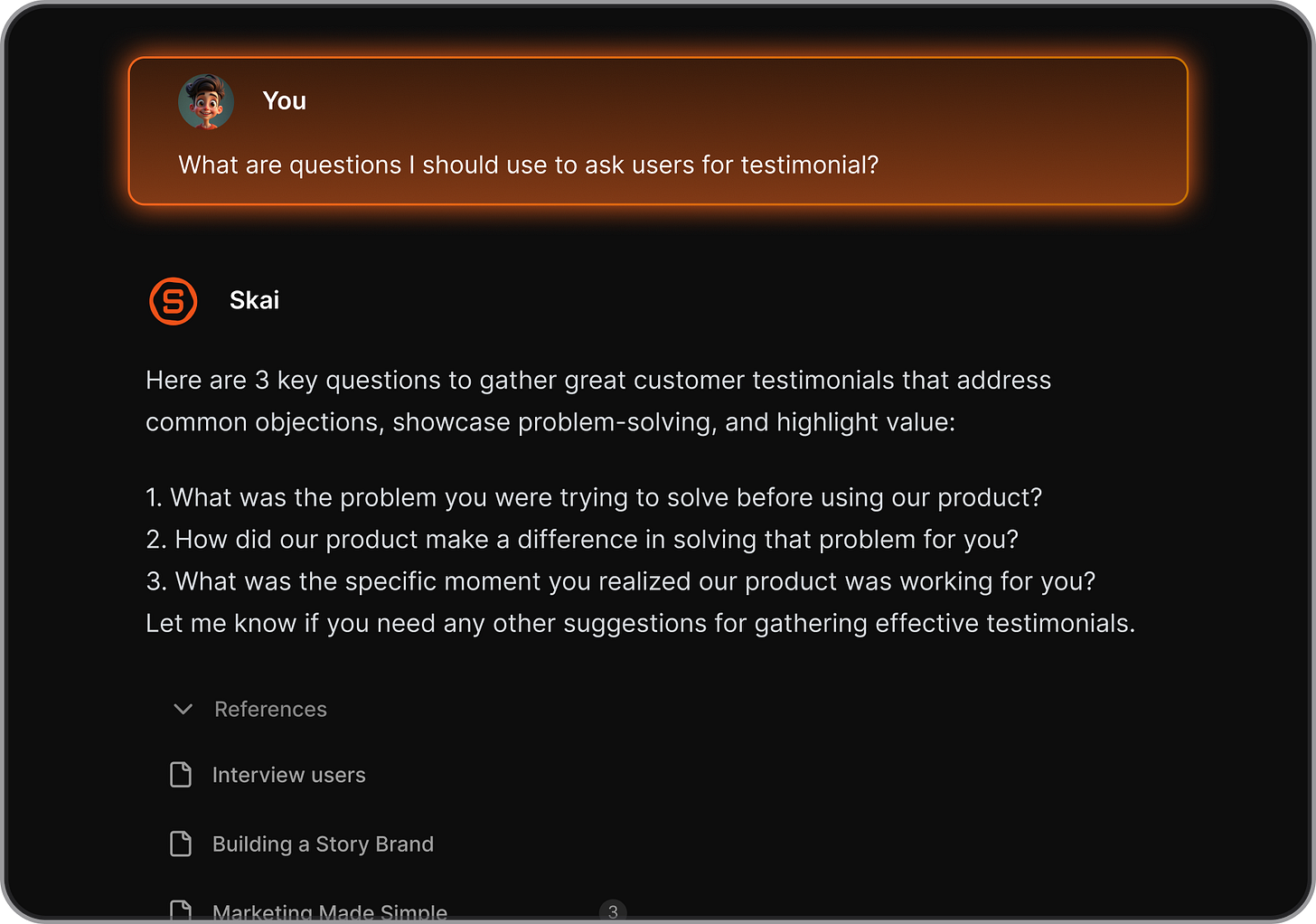
“I was impressed that Saner.AI answers questions based on my own knowledge through Skai. It’s like having a personal secretary.” — reviews
Pros:
- The free plan is genuinely usable, not just a teaser.
- Onboarding is fast. You’re capturing notes within minutes, not configuring for an hour.
- Reduces context switching for knowledge workers more than any other tool on this list.
I don’t have to remember where I put things. Skai finds it.
“This was the best spent 8 hours of any tool I have used on Product Hunt in a long while. The UI/UX experience is very user-friendly and is pretty intuitive.” — reviews
Cons:
- The mobile app performance is inconsistent for some users. Better on desktop.
- It’s still growing.API integrations are limited.
Pricing:
- Free — 30 AI requests/month, 100 notes, 100MB storage
- Starter — $8/month (annual) or $12/month (monthly) — increased AI usage, full integrations
- Standard — $16/month (annual) or $20/month (monthly) — full access, priority support
What users say:
Users consistently describe Saner.AI as the first tool that actually reduces cognitive load rather than adding to it. The ADHD-specific positioning is real, not just marketing copy. The most common criticism is that the mobile experience needs work.
“Totally great! I consider it my life manager. It helps a lot to keep all tasks neatly organized.” — reviews
“While alternative second-brain tools feel like static databases, Saner feels like an active partner.” — reviews
Suitable for:
- Knowledge workers, researchers, freelancers, and consultants who manage information across too many apps
- ADHD adults whose main struggle is losing track of information, not just tasks
- Anyone who needs an AI-assisted daily plan without building the system from scratch
How to get started:
Sign up for the free plan at saner.ai, and spend your first session importing notes from wherever you currently store them (Notion, Google Drive, plain docs).
2. Tiimo
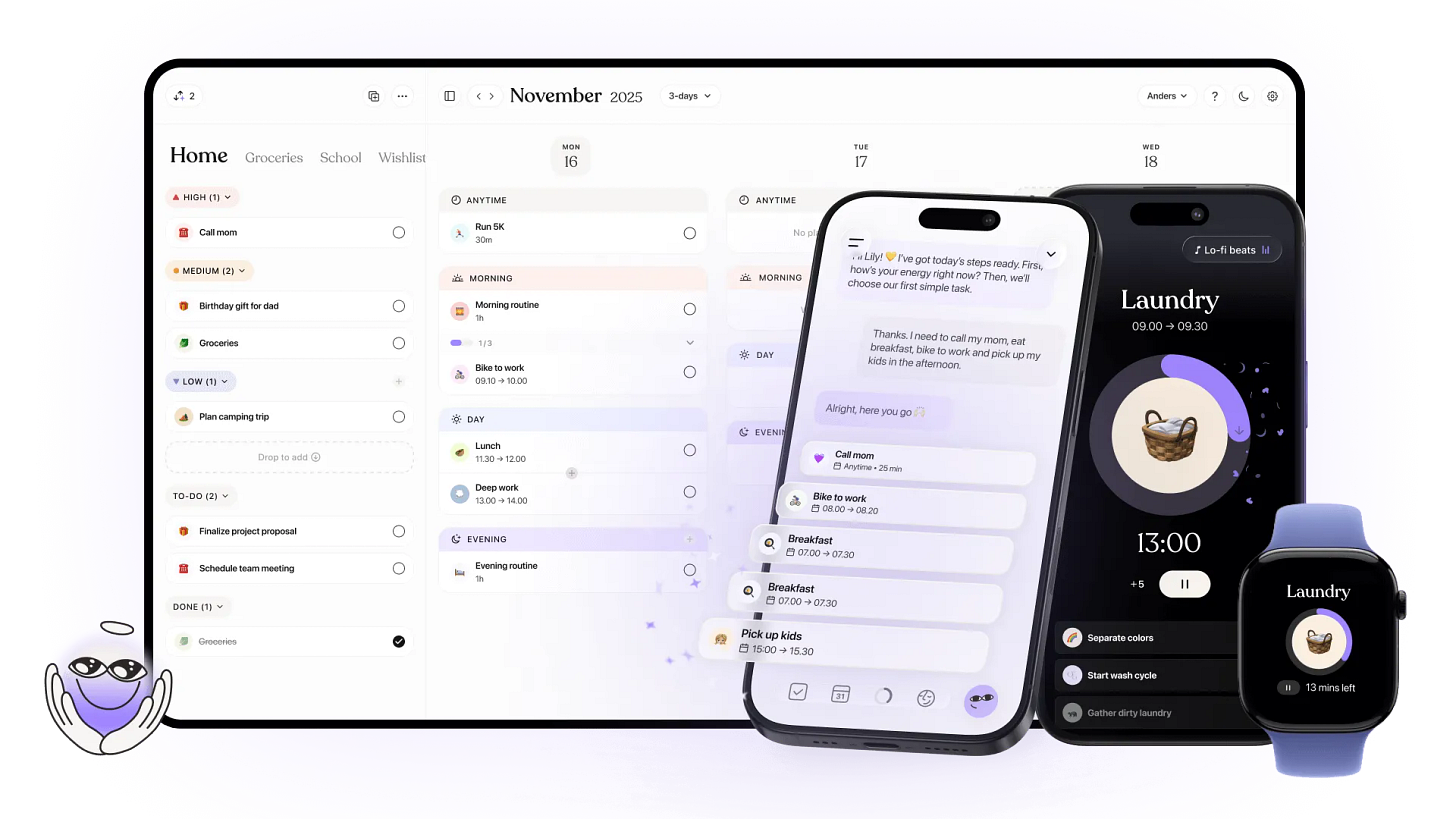
Tiimo is was built as a research project on neurodivergent teens in 2015 before becoming a consumer product
Key features:
- Visual timeline: Your day appears as color-coded blocks rather than a text list. Time becomes something you can see rather than a number on a clock.
- Focus countdown timer: A visible countdown runs alongside each task, making the passage of time impossible to ignore without being stressful.
No punishment for missed tasks: Nothing turns red. Nothing gets marked as failed. Tasks just move forward. This removes the emotional barrier that makes most people abandon productivity apps.
“Tiimo is intentionally simple, which means it’s not built for complex project management.” — reviews
Pros:
- I finally understand where my time goes. Seeing the day laid out as blocks is different from reading a list.
- Guilt-free design. No aggressive overdue notifications, no shame mechanics.
- Apple Watch integration means quiet wrist taps instead of loud alarms
Cons:
Setting up Tiimo for the first time — inputting tasks, routines, and preferences — takes time. Users who want something quick to start report friction.
“Setting up Tiimo can be time-intensive and somewhat complex, especially for people who just want something simple and quick to use.” — reviews
Limited for complex project management. No subtasks, dependencies, or analytics dashboards.
“Tiimo is intentionally simple, which means it’s not built for complex project management. If your work depends on deep task hierarchies, Tiimo may feel limited.” — reviews
Pricing:
- Free — basic planner, limited AI chats, 1 profile
- Pro — ~$10/month or ~$4.50/month billed annually (~$54/year) — full features, AI Co-Planner, widgets, neuroinclusive courses, web version, 7-day free trial
What users say:
“The founders share that they often get feedback from users that the app changed the way they work, the way they live, the way they thrive.” — reviews
Suitable for:
- Anyone whose primary ADHD challenge is time blindness and task transitions
- Visual learners who can’t make a text-based to-do list stick
- Parents of neurodivergent children who need a shared visual routine tool
- Apple ecosystem users (best experience on iOS/macOS/Apple Watch)
How to get started:
Download the free version and spend your first session building one routine — morning or evening, not both.
3. Sunsama
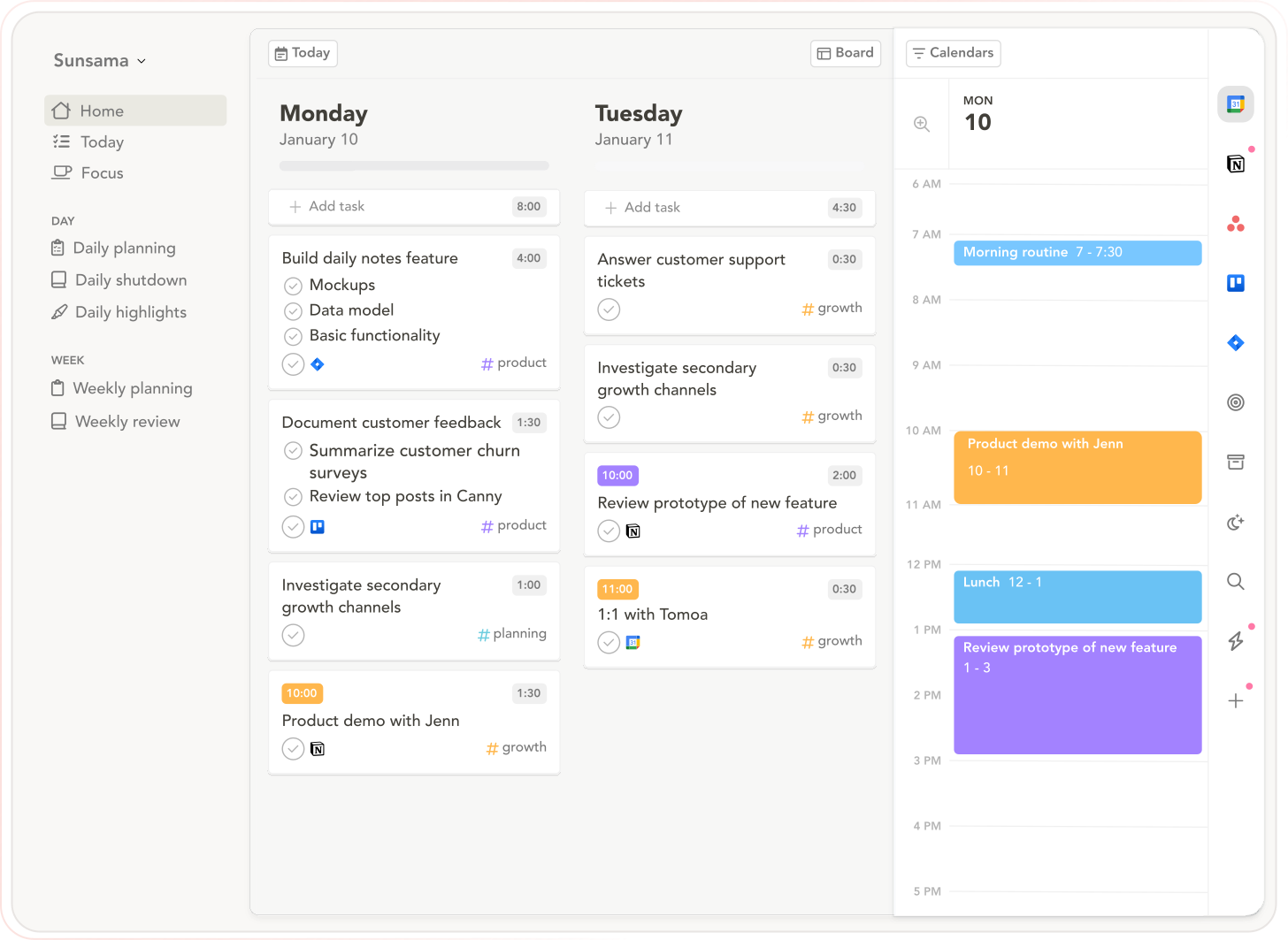
Sunsama is the most opinionated tool on this list. It has a very clear idea of how you should plan your day — slowly and intentionally — and it will nudge you toward that process every morning whether you want it to or not.
If you want AI to do all that for you, Sunsama is not your app. It’s manual by design.
Key features:
- Guided daily planning ritual: Each morning, you pull tasks from connected tools, estimate how long each will take, and build a plan that fits your available time.
- Time estimation and time blocking: Sunsama makes you put a time estimate on every task before it goes on your day. This forces time awareness that most ADHD brains avoid.
- Task aggregation from multiple tools: Connect Asana, Trello, Gmail, Notion, GitHub, Linear, Slack. All your tasks in one place without copying them manually.
- Weekly review: See what you planned vs. what you actually completed.
Pros:
- Cross-platform: Web, iOS, Android, Mac, Windows.
- Integrations are genuinely broad and reliable.
The daily ritual forces me to stop and actually think about what I can do today. It’s the only tool that’s fixed my chronic over-commitment problem.
“It’s planning the day feature ‘forces’ people to stop and think about the tasks they need to include in their day. And the ease of moving lower priority tasks to the next day is perfect.” — reviews
Cons:
- No Apple Calendar support — Google and Outlook only.
Mobile experience is limited. Core planning works best on desktop.
“The mobile apps exist for viewing and quick additions, but the core planning experience works best on a computer.” — reviews
The daily ritual requires its own executive function to initiate. If opening the app each morning is itself the blocked task, the tool never delivers.
“Sunsama assumes the daily ritual will happen. This is a fundamental gap between productivity tool design and ADHD reality.” — reviews
Pricing:
- No free plan
- Monthly — $20/month
- Annual — $16/month ($192/year)
What users say:
Sunsama attracts two types of reviews: people who call it life-changing, and people who tried it for a week and cancelled. The difference usually comes down to whether the user is willing to show up for the daily ritual.
“I have been suffering from overwhelm for a while now, and this software is perfect for that. If you have 100 tasks on your list and don’t know where to start, this is exceptionally useful if you struggle with ADHD.” — reviews
“Sunsama doesn’t automatically schedule or prioritize tasks for you. YOU need to do that each day. If you forget or it falls to the wayside, you might end up paying for a tool that sits dormant.” — reviews
Suitable for:
- Remote professionals, freelancers, and consultants juggling tasks across multiple platforms
- ADHD adults whose main failure mode is over-commitment, not procrastination
- People who find the planning ritual itself grounding, not a chore
How to get started:
Connect your calendar first, then one task manager (start with just one). On day one, keep your daily plan to three to five tasks.
4. Amazing Marvin
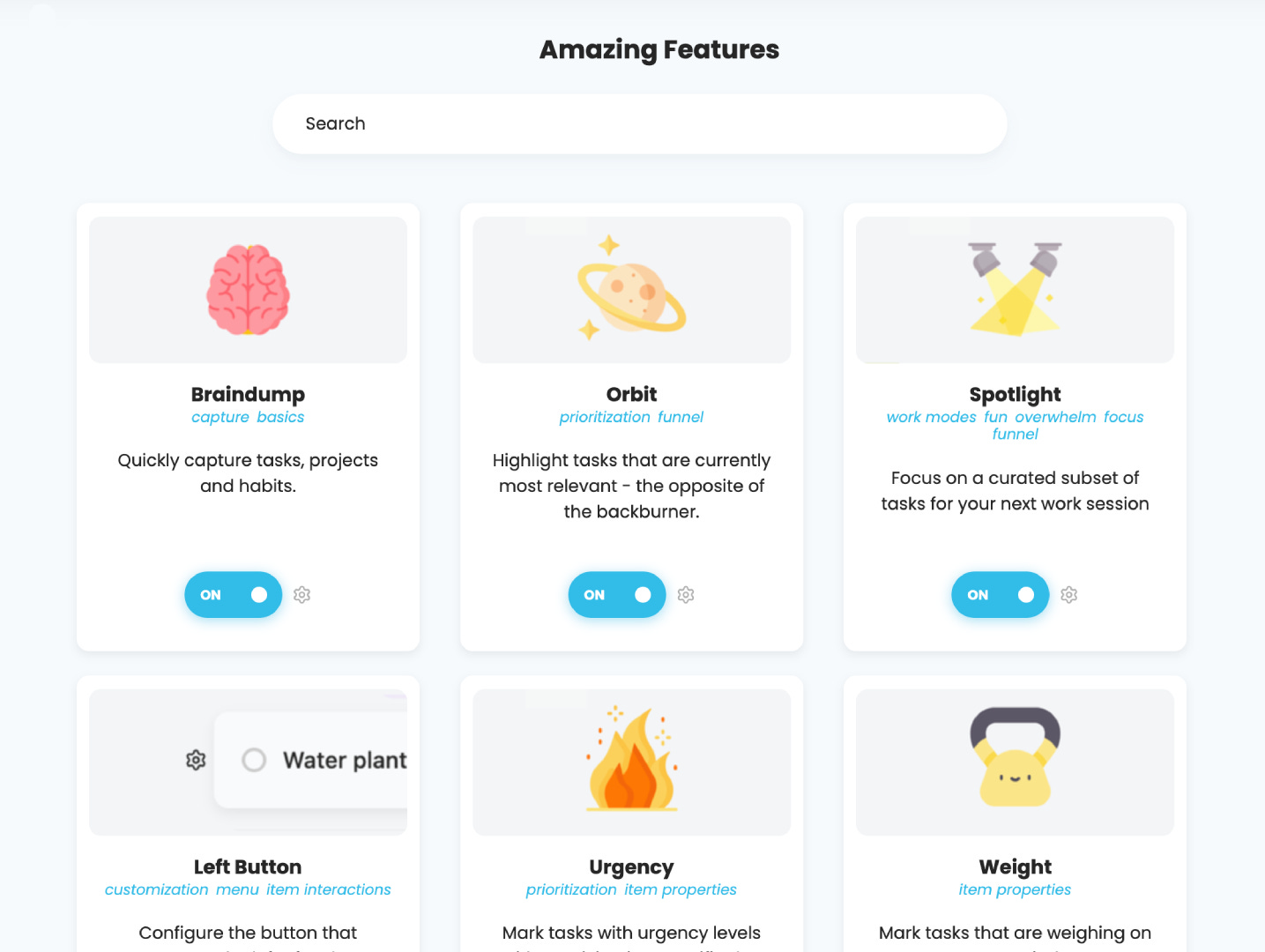
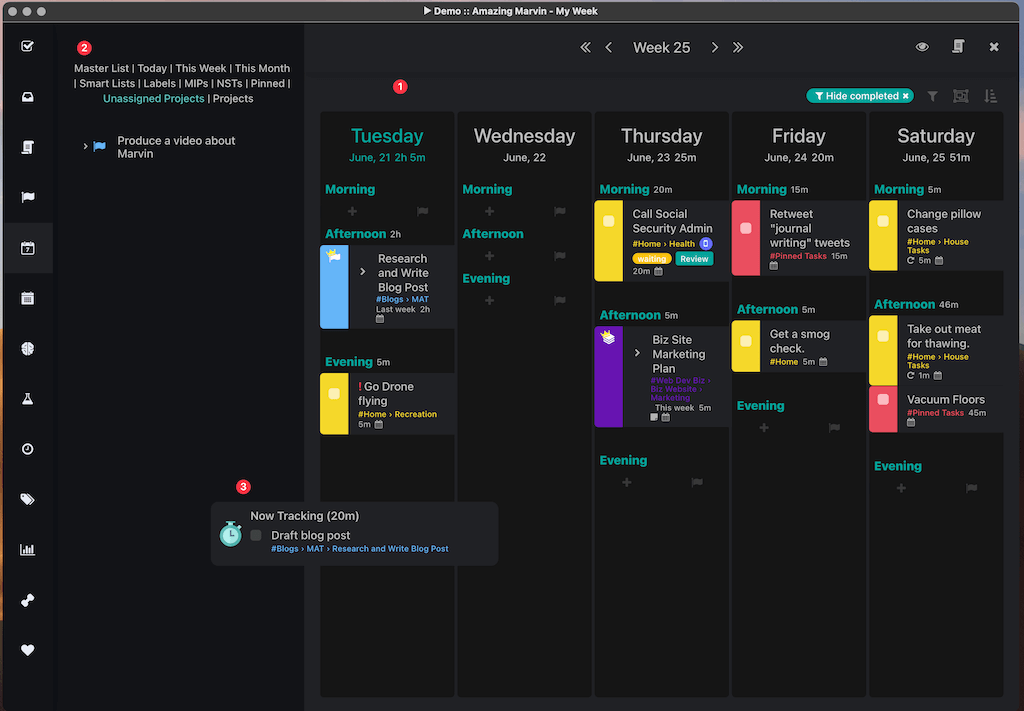
Amazing Marvin is not an easy app. It’s a toolkit with over 100 configurable strategies, and if you turn them all on at once it looks like a cockpit. But that’s the point: Marvin doesn’t impose a system on you. You build the system that fits your specific ADHD presentation.
For people who’ve burned through every other tool and still haven’t found something that sticks, Marvin is worth the learning investment.
Key features:
- Strategies library (100+ toggleable features): Every feature is opt-in. You build the system from scratch rather than fighting against one that doesn’t fit you.
- Procrastination Wizard: A unique feature that actively helps you get unstuck. When you can’t start a task, the Wizard walks you through identifying the blocker and choosing a strategy to break through it.
- Time blocking and Pomodoro timer: Both built in. You can schedule tasks into time slots and work in focused intervals without needing a separate timer app.
- Habit tracking and gamification: Earn points for completing tasks. Habits and projects tracked in the same tool. For ADHD brains driven by novelty and reward, this is more than a gimmick.
Pros:
- No credit card required for the 14-day trial, and students get 50% off.
- Offline desktop support on Mac, Windows, and Linux.
I’ve never found an app that couldn’t, at least in theory, accommodate the way I work. Marvin has a strategy for almost every ADHD pattern.
“As someone with ADHD, I’m amazed at the flexibility and options it provides. I quickly cycle through tools and need something new.” — reviews
Cons:
- No free plan. $12/month without a discount is steep for a solo task manager.
The mobile app is weaker than the desktop experience. Several reviewers note the Android app in particular is clunky.
“The iOS apps are lacking my favorite features of the desktop app. My beloved Procrastination Wizard is not on mobile.” — reviews
The learning curve is real. Turning on 100 features at once is overwhelming, especially for ADHD brains that struggle with setup.
“It takes a while to really learn all of the tools that Amazing Marvin has, which can be overwhelming at first, particularly for folks with ADHD.” — reviews
Pricing:
- No free plan
- Monthly — $12/month
- Annual — $8/month ($96/year, billed upfront)
What users say:
Amazing Marvin has a devoted following among ADHD adults who describe it as the last task manager they’ll ever need. The loudest complaints are about the learning curve and the mobile experience.
“Amazing Marvin is the first thing I open every morning. It is the lifeblood of everything that I do personally and in business.” — reviews
“Perhaps a steep learning curve for the first couple days, but it turns into a tool I cannot do without.” — reviews
Suitable for:
- ADHD adults with complex workflows who need total control over how their system is structured
- People who’ve tried simpler tools and found them too rigid
- Power users comfortable with a multi-week setup investment
How to get started:
Start the trial and turn on exactly three strategies on day one. Not ten. Three. The Marvin team actually recommends this in their onboarding.
5. Structured
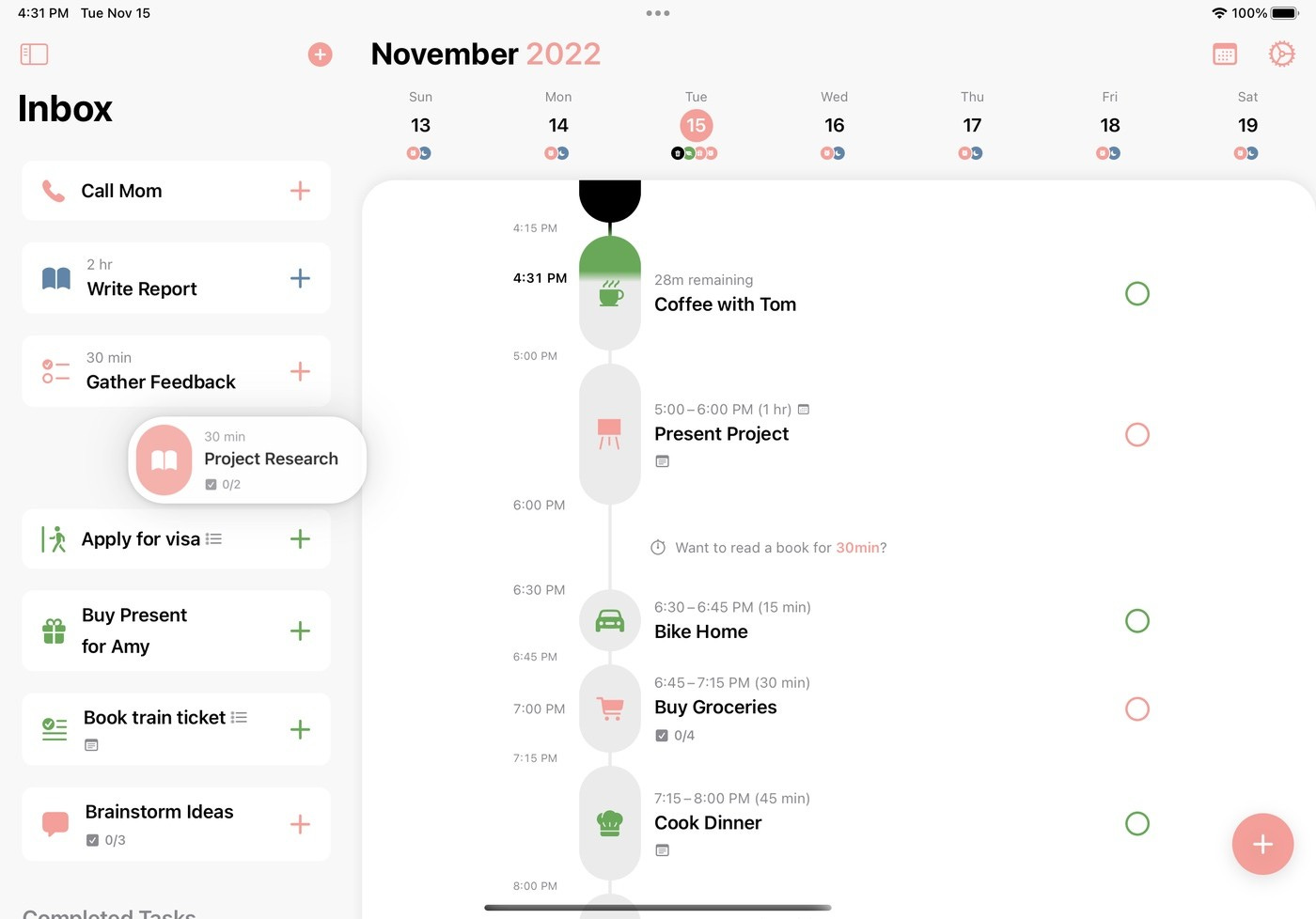
Structured is the simplest tool on this list and, for many ADHD users, that’s the point. It takes your calendar and your to-do list and combines them into a color-coded timeline of your day. That’s it. No AI writing your tasks for you, no elaborate strategy library, no guided ritual. Just a clear picture of what’s happening when.
Key features:
- Visual daily timeline: Every task and event appears as a colored block on a vertical timeline. You can see the whole day at a glance.
- Calendar and reminders sync: Pulls in your Google, Outlook, or Apple Calendar events automatically. You see meetings and personal tasks on the same timeline.
- Auto-moves missed tasks: When a task runs over or gets skipped, Structured adjusts rather than marking it overdue in red. No guilt mechanics.
Pros:
Fast to start. Add a task, give it a time, see it on your day. No configuration needed.
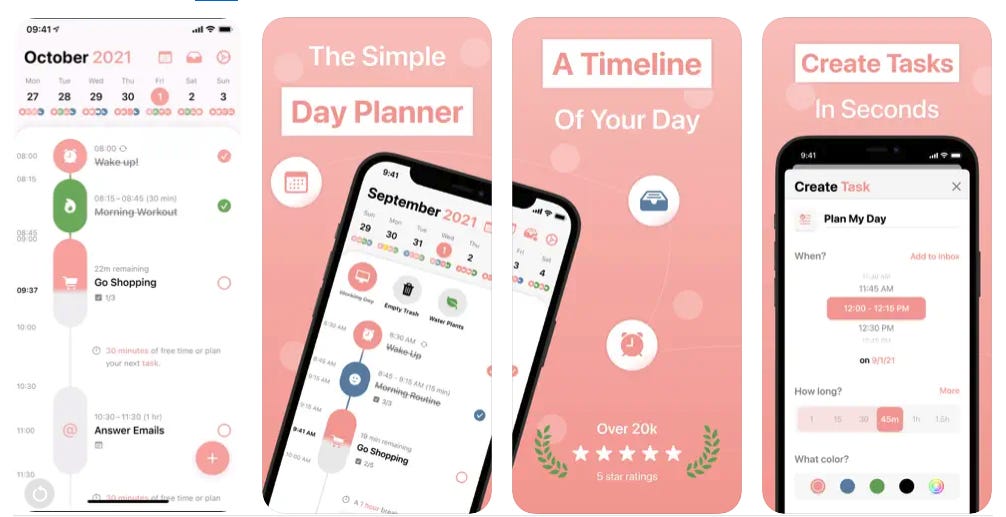
I can see my entire day in under five seconds. That’s genuinely different from reading a list.
“When I first stumbled across Structured, I was shocked how good it is and how well it meets all of the features I was missing from other planning apps before. It is so pretty and easy to use!” — reviews
Cons:
- Limited for complex projects. No subtask hierarchies, no team features, no dependencies.
- The free version is usable but too limited to properly evaluate the app.
Apple-first. The Android app exists but gets mixed reviews — some users describe it as sluggish.
“I wasn’t able to stick with this for more than a week. Maybe it’s too many functions or the Android app looked a little sluggish.” — reviews
Pricing:
- Free — basic timeline, limited tasks
- Pro — ~$3.99/month or ~$19.99/year
What users say:
Structured reviews are among the most emotionally positive of any productivity app. Users with ADHD describe it as a lifeline.
“I NEVER write reviews, but Structured was so sweet and helped me I absolutely had to! I severely struggle with ADHD and recently started living on my own and can’t get access to medication. Structured is amazing.” — reviews
“It’s so pretty and easy to use! I instantly bought the lifetime version, since I don’t want to spend one more day without Structured.” — reviews
Suitable for:
- Apple users who want a clean, visual daily timeline without setup complexity
- ADHD adults whose main challenge is time blindness, not information overload
- People who want something they’ll actually open every day without friction
How to get started:
Download the free version and connect your primary calendar. On day one, add your three most important tasks for tomorrow and assign each a time slot.
Conclusion
The best ADHD planner isn’t the one with the most features. It’s the one you’ll still be using in three months. That usually comes down to one question: what’s the actual thing that breaks down for you?
If it’s losing information and overwhelm, Saner.AI. If it’s time blindness, Tiimo or Structured. If it’s over-committing your day, Sunsama. If it’s everything, Amazing Marvin.
These reduce the number of executive function decisions you have to make before you can start working - and for ADHD brains, that friction is often the whole problem.
Pick one. Use it for 30 days before switching.