How I Prioritize Tasks With ADHD (When Everything Feels Urgent)

Quick answer: Prioritizing with ADHD fails when you use ranking systems built for brains that can feel the difference between "due Friday" and "due in March." The fix is to stop ranking and start cutting. Dump everything out of your head, mark only what is genuinely live this week, pick three outcomes, and attach each one to a specific time and a specific first action.
I spent about 2 months trying to make the Eisenhower matrix work. Four quadrants. Urgent, important, the whole grid. Every single time, I'd put nineteen things in "urgent and important," stare at it, feel worse than before I started, and go reorganize my Notion instead 😭
The matrix asks you to feel relative importance, and ADHD makes that feeling unreliable in a very specific way.
So here's what works for me
Why prioritizing tasks with ADHD feel harder
Your brain ranks by interest and urgency, not importance
The National Institute of Mental Health lists trouble "organizing tasks and activities, managing time, and meeting deadlines" as a core inattention symptom of ADHD (NIMH).
There's also a reward piece. A meta-analysis of 37 group comparisons covering 3,763 participants found that people with ADHD choose small immediate rewards over larger delayed ones more often than controls, across both choice-delay and temporal-discounting tasks (Marx et al., Journal of Attention Disorders, 2021).
>> The email that takes four minutes and gives you a tiny hit of "done" will beat the quarterly plan that pays off in eleven weeks. Every time. Your ranking system is competing against your reward system, and your reward system is not interested in a debate.
Deadlines that aren't today barely register
The CDC notes that adult ADHD symptoms often intensify as responsibilities pile up, and show up as trouble with attention, finishing tasks, and organization rather than the obvious bouncing-off-walls version (CDC).
Practically, that means most of us run a two-setting clock: now and not now. A thing due in nine days and a thing due in nine weeks live in the same folder in your head, which is the folder marked "later, probably fine." Then both arrive at once.
👉 If you want the longer version of that mechanism, we wrote it up in ADHD time blindness.
Holding the list in your head is the real bottleneck

You can't rank twenty items you can't see. Trying to compare "call the dentist" against "draft the Q4 proposal" while also remembering fourteen other things is the mental equivalent of doing long division while someone reads you random phone numbers.
This is why every step I use starts with getting the list out of your head.
And then there's the freeze
ADHD decision paralysis is what happens when the list gets long enough that no option feels safely correct, so your brain picks the only option with zero risk: nothing. You know the feeling. You've got four hours, you know they matter, and you spend seventy minutes deciding what to start. Then it's lunch.
That freeze isn't laziness. I wrote a whole piece on executive dysfunction versus laziness.
The four-step system I use to prioritize tasks with ADHD
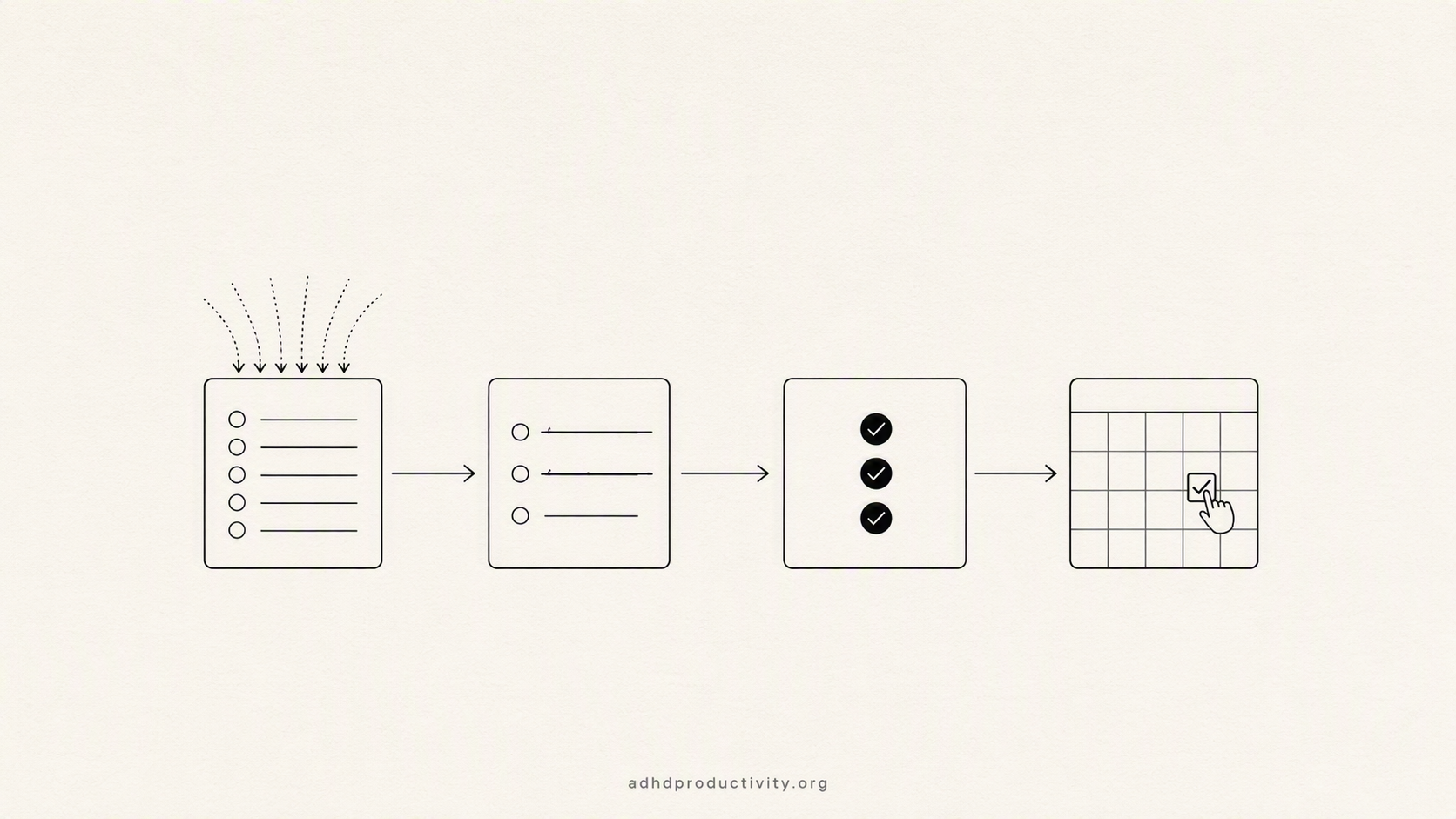
Step 1: Dump everything, and I mean everything
Open a blank note. Write down every single open loop. Work, home, the half-finished thing in the garage, the text you haven't answered, the appointment you keep meaning to book.
Rules for the dump:
- Set a timer for 4 minutes
- Don't categorize while you're dumping
- Include the small stuff
- Write the emotionally annoying items too. Especially those. The tax thing. Write the tax thing.
I land somewhere between 15 and 35 items. That number is going to feel horrifying. Good.
If typing kills the flow, talk it out. Voice capture gets around the "I lost the thought while finding the notes app" problem - a few options in our voice-to-text tools roundup.
Step 2: Cut before you rank
Go through the list once and mark every item with exactly one of three letters:
- L (Live). There's a real consequence this week if it doesn't move. A deadline, a person waiting, a bill, a thing that blocks someone else.
- S (Someday). Real, matters, not this week. Moves to a separate list you are allowed to completely ignore until next Sunday.
- D (Dead). You've been carrying it for three months and nothing bad has happened. Delete it. If it's important it will come back and find you, usually loudly.
If you're stuck on an item for more than five seconds, it's an S.
I killed eleven items the first time I did this. Nothing happened. Nobody noticed.
You'll usually find only 8 to 15 things are actually Live. That drops the paralysis by half, because you've gone from "rank 50 things" to "choose among 12."
Step 3: Pick three outcomes, not three tasks
From the Live list, choose three outcomes that would make the week a genuine win.
Outcomes, not tasks. "Proposal sent to Dana" is an outcome. "Work on proposal" is a not.
Three. Not more than that. If your weekly planning needs more structure around this, our full weekly planning system walks through the whole session.
When two things feel exactly equal, and they will, constantly, run these tie-breakers:
- Which one blocks another person? Anything someone else is waiting on wins. Their time is a real external deadline, and external deadlines are the only kind our brains reliably respect.
- Which one gets more expensive if I delay it? Passport renewal gets more expensive in a very literal way. Most urgent emails do not.
- Which one unlocks the most other items? One task that clears four downstream tasks beats three standalone ones.
- Which one have I rescheduled the most times? Repeat offenders aren't unimportant. They're usually undefined, which is a Step 4 problem.
- Still tied? Flip a coin. If two options survive four tie-breakers, the difference between them is small
Most decision paralysis isn't between a good option and a bad option. It's between two fine options, with a brain that treats fine as insufficient evidence to move.
Step 4: Attach each outcome to a time and a first physical action
For each of your three outcomes, write one line in this exact shape:
When [specific day and time], I will [very small first physical action] at [specific place].
So: "Wednesday at 9:15am, I will open the proposal doc and write the section headers, at my desk."
This is an if-then plan, and it isn't folk wisdom. Gawrilow and Gollwitzer found that furnishing a goal with implementation intentions improved response inhibition in children with ADHD to the level of their non-ADHD peers on a Go/No-Go task (Cognitive Therapy and Research, 2008). The plan does part of the deciding in advance, when you have the capacity, so that the moment itself needs less of it.
Two details that make or break this:
- The first action has to be embarrassingly small. "Open the doc and write headers," not "draft the proposal." If your first step still feels like a task, break it down further. Using AI to break tasks down is faster than doing it by hand when your brain is already tired.
- Put it in the calendar, not the to-do list. A to-do list is a suggestion box. A calendar block is a claim on real time. Our guide to time blocking with ADHD covers how long to make the blocks, which is shorter than you think.
How to break ADHD decision paralysis in the moment
The weekly system reduces paralysis. It doesn't eliminate it. Here's what to do when you're frozen at 2pm with a clear list and zero movement.
- Set a 90-second decision timer. Out loud: "I have ninety seconds to pick, then I start whatever I've picked." The constraint does the work. A bad choice executed beats a perfect choice contemplated until 4pm.
- Pick the ugliest one. Not the most important. The one generating the most dread. Dread is a surprisingly accurate signal, and clearing it usually frees up more capacity than the task itself required.
- Shrink the unit. Can't choose between three tasks? Do ten minutes of the first one. You're not committing to finishing. You're breaking the freeze, which is a different problem with a different solution. See task initiation.
- Get a witness. Text someone: "I'm doing the proposal for the next 30 minutes." Or use body doubling. Announcing a choice is a cheap way to make it feel decided.
- Ask someone else to pick. Show a colleague or partner two options and let them choose. The relief is immediate and slightly humbling.
- Notice if it's a capacity problem. Sometimes the freeze means the tank is empty, not that the list is confusing. If you've been frozen for days, not hours, read ADHD burnout before you buy another planner.
When your job says everything is priority one

Most prioritization advice assumes you control your list. Plenty of us don't.
A few things that have actually worked for me:
- Make the trade-off visible, not the refusal. Never "I can't." Always "I can do A by Thursday or B by Thursday, not both. Which do you want?" You've handed the ranking problem to the person who owns it. Nine times out of ten they'll pick, and often they'll pick the one you'd have picked.
- Put your three outcomes somewhere your manager sees them. A pinned Slack message on Monday morning does more for your week than any private system. It also quietly documents what you did when someone asks in six weeks.
- Protect one block, not your whole calendar. Asking for "focus time" as a blanket policy fails. Asking for one recurring two-hour block usually doesn't. More on what to ask for in ADHD accommodations at work.
- Kill the status meeting update you write from memory. If you're rebuilding your priorities every time someone asks for a status, you're paying the ranking cost several times a week. Keep the list somewhere you can read from. Meetings with ADHD has more on this.
Where tools actually help (and where they don't)
Where software genuinely pulls weight is in the holding. The dump, the Someday list you're supposed to ignore for six days, the fourteen small commitments scattered across email and Slack and a voice note. Holding those is expensive, and it's expensive in exactly the resource you need for deciding.
I use Saner.ai for this part. Notes, tasks, calendar and email sit in one place, and the AI does the sorting instead of handing me an empty database and a tutorial. Capture a thought, it files itself. I reviewed it properly in the best AI task manager for ADHD, including the parts that annoy me.
If you'd rather see the wider field first, there's our roundup of ADHD task management apps and a free-apps list that doesn't require a subscription.
One warning, rebuilding your system is not prioritizing. It feels identical. It produces nothing.
Frequently asked questions
Why is prioritizing so hard with ADHD?
Because ADHD affects the machinery that ranks things, not the part that understands what matters. The NIMH lists difficulty organizing tasks and managing time as a core inattention symptom (NIMH), and a 2021 meta-analysis by Marx and colleagues found a stronger pull toward immediate over delayed rewards (Marx et al., 2021). You know the proposal matters more than the inbox. Knowing isn't the bottleneck.
Is decision paralysis a symptom of ADHD?
"ADHD paralysis" is popular shorthand rather than a clinical diagnosis. It describes freezing when faced with too many options or an overwhelming list, and it maps onto the task-organization and time-management difficulties the NIMH lists among inattention symptoms. Useful word. Just not a diagnosis.
How many priorities should I have per day?
One must-do, two nice-to-dos. If the must-do is done by 2pm, the day was a success and anything else is a bonus. Daily lists of seven items are a recipe for feeling like a failure at 6pm despite having worked for nine hours.
Does the Eisenhower matrix work for ADHD?
Rarely, in my experience, because it requires you to accurately feel the difference between urgent and important - which is the exact perception ADHD makes unreliable. A cut-first approach works better: eliminate down to what's live, then pick three. If you love the matrix and it works for you, ignore me and carry on.
What if everything on my list is genuinely urgent?
Then it's a capacity problem rather than a prioritization problem, and no system fixes it from the inside. Make the trade-off visible to whoever owns the list, and pick the item someone else is blocked on. If this is every week rather than one bad month, that's worth raising before it becomes burnout.
Do ADHD medications help with prioritizing?
Some people find decision-making easier on medication, some don't, and it's a question for your prescriber rather than a blog. What I'd say is that medication and systems solve different halves of the problem. Neither one makes the other unnecessary.
How often should I redo this?
Full version weekly, roughly twenty minutes. Two-minute version each morning: look at the three outcomes, pick today's one thing, confirm the calendar block still exists. If you skip a week, restart with the dump. Don't try to reconstruct where you left off.
Your action steps for the next twenty minutes
- Open a blank note and set a six-minute timer. Dump every open loop, work and personal, small and large.
- Go through once and mark each item L, S, or D. One pass, five seconds per item, no agonizing.
- From the L items, pick three outcomes, phrased as finished results rather than activities.
- For each one, write: When [day, time], I will [tiny first action] at [place]. Put all three in your calendar right now.
- Move the S list somewhere you won't see it until next week. The D list gets deleted, permanently, with a small amount of ceremony if that helps.
- Tomorrow morning, look at your three and pick one. Just one.
A perfectly ranked list has never once been the thing standing between me and a good week. What helps is a list short enough that starting stops being a decision.
Sources
- National Institute of Mental Health — Attention-Deficit/Hyperactivity Disorder: What You Need to Know
- Centers for Disease Control and Prevention — ADHD in Adults
- Marx, I., Hacker, T., Yu, X., Cortese, S., & Sonuga-Barke, E. (2021). ADHD and the Choice of Small Immediate Over Larger Delayed Rewards: A Comparative Meta-Analysis. Journal of Attention Disorders, 25(2).
- Gawrilow, C., & Gollwitzer, P. M. (2008). Implementation Intentions Facilitate Response Inhibition in Children with ADHD. Cognitive Therapy and Research, 32.