Sunsama Review for ADHD: Is this Calm Planner Worth $22 a Month?

I have paid for a lot of planners I stopped opening by day nine. Sunsama is one of the few I kept paying for after the trial, and also one of the few I'd tell a lot of ADHD friends to skip. Both things are true.

Quick answer: is Sunsama good for ADHD?
Yes, if your main problem is overcommitting, you work a desk job with tasks scattered across Gmail, Slack, Asana, Jira or Notion, and you can show up for a 10-minute planning ritual most mornings.
No, if you want the app to plan your day for you, you struggle to open any app on a bad morning, or $17 to $22 a month would put you into ADHD tax territory.
- Price: $22/month, or $17/month billed yearly. 14-day free trial, no card needed. No free plan
- Best ADHD feature: the workload warning that tells you, before 9:30 a.m., that your plan is fantasy
- Biggest ADHD risk: the whole system depends on a daily ritual, and rituals are exactly what ADHD brains drop first
- Platforms: macOS, Windows, Linux, web, iOS, Android
What is Sunsama?
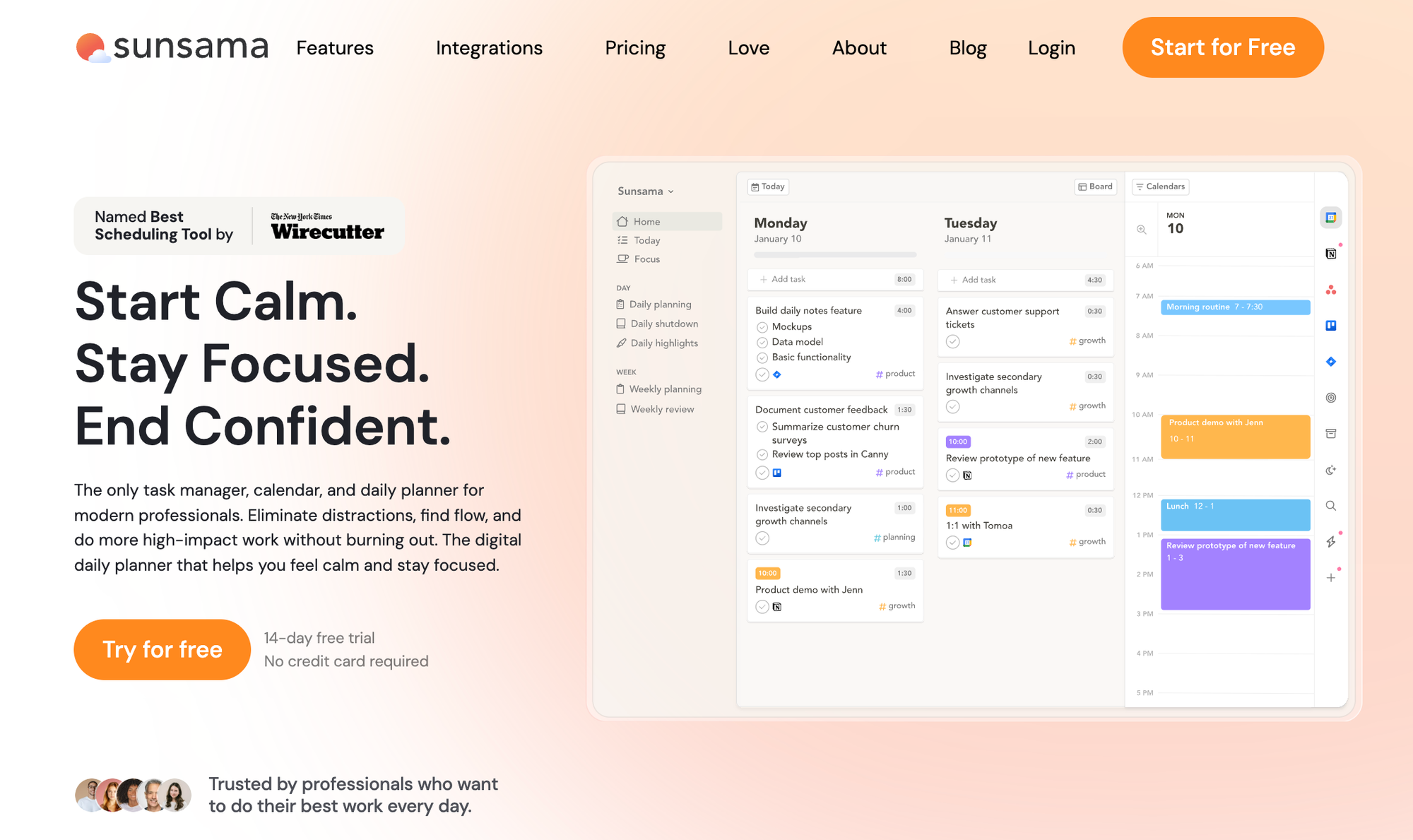
Sunsama is a daily planner that pulls your tasks and calendar into one screen and walks you through planning a single day. It isn't a project manager. It's closer to a very coach who sits you down every morning and asks, "Okay. What are you doing today?"
The core loop looks like this:
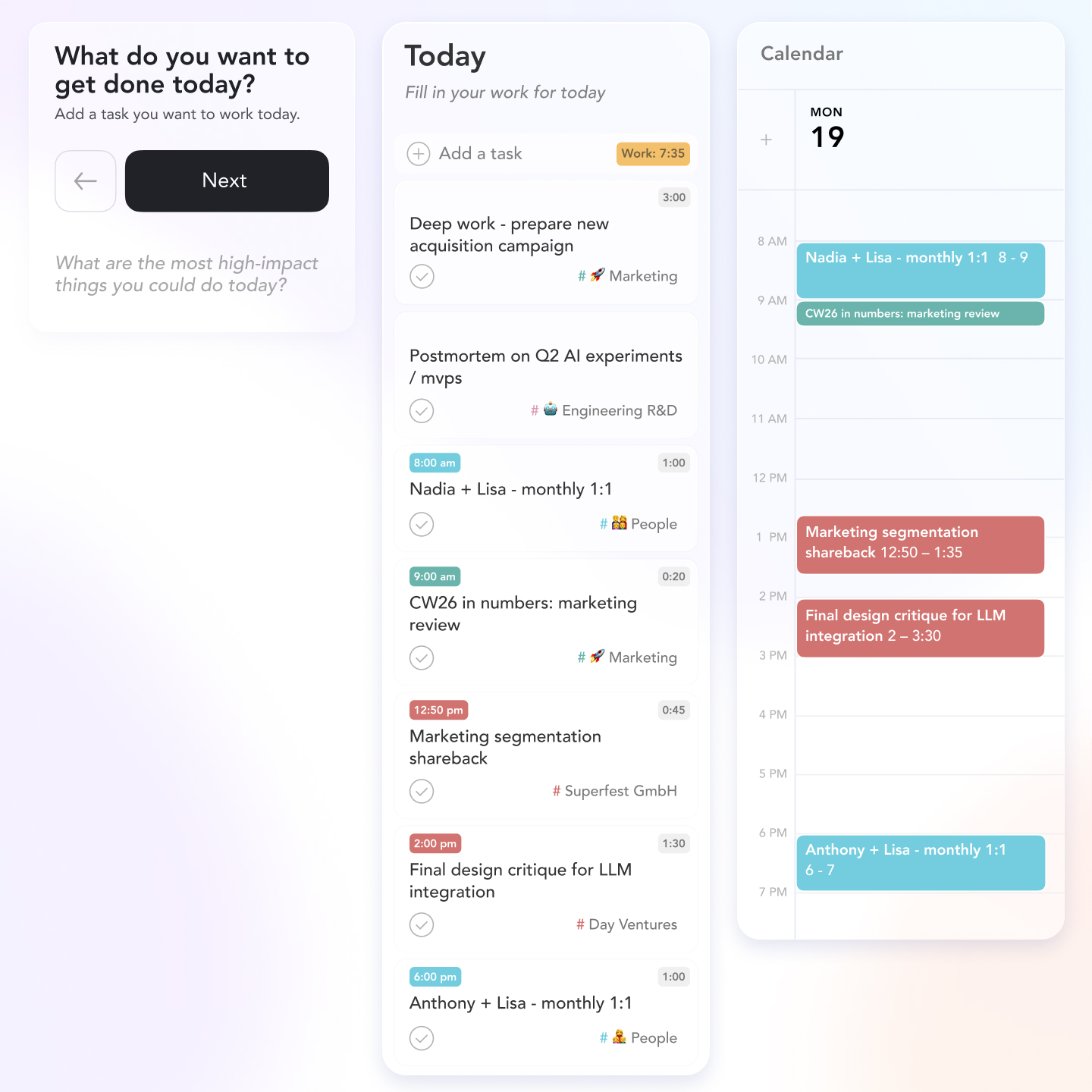
- Morning: a guided planning flow. You pull tasks in from your calendar, backlog, email or connected tools, add time estimates, and drag them onto your day.
- During the day: you timebox tasks onto your calendar and use focus mode with a timer.
- Evening: a shutdown ritual where you review what got done, and whatever you didn't finish rolls to tomorrow.
According to Sunsama's daily planning guide, the morning flow has five steps: reflect on yesterday, add tasks, check your predicted workload, finalize and timebox, then optionally share your plan to Slack or Teams.
How does Sunsama help with ADHD brains?
It attacks overplanning, which is a big ADHD problem
It catches the "I'll do 14 things today" delusion
Sunsama adds up the planned time on your tasks and compares it against a workload threshold you set. Go over it and you get a warning. The help docs suggest new users aim for about 5.5 hours of planned work in a normal 9 to 5 day, which sounds insulting until you try it.
Your gut sense of "that'll take 20 minutes" is not a reliable instrument. The workload bar is an external one. If time blindness is a daily fight for you, this feature alone might justify the trial.
The shutdown ritual gives you an actual end to the day
A lot of ADHD adults don't stop working. They just collapse. Sunsama's shutdown asks you to close the day on purpose: mark what's done, move the rest, write a line about how it went. It's a small thing. It's also the part I'd miss most if I quit.
If you've been sliding toward ADHD burnout, a hard stop that the software nags you about is worth more than another feature.
Everything lands in one place
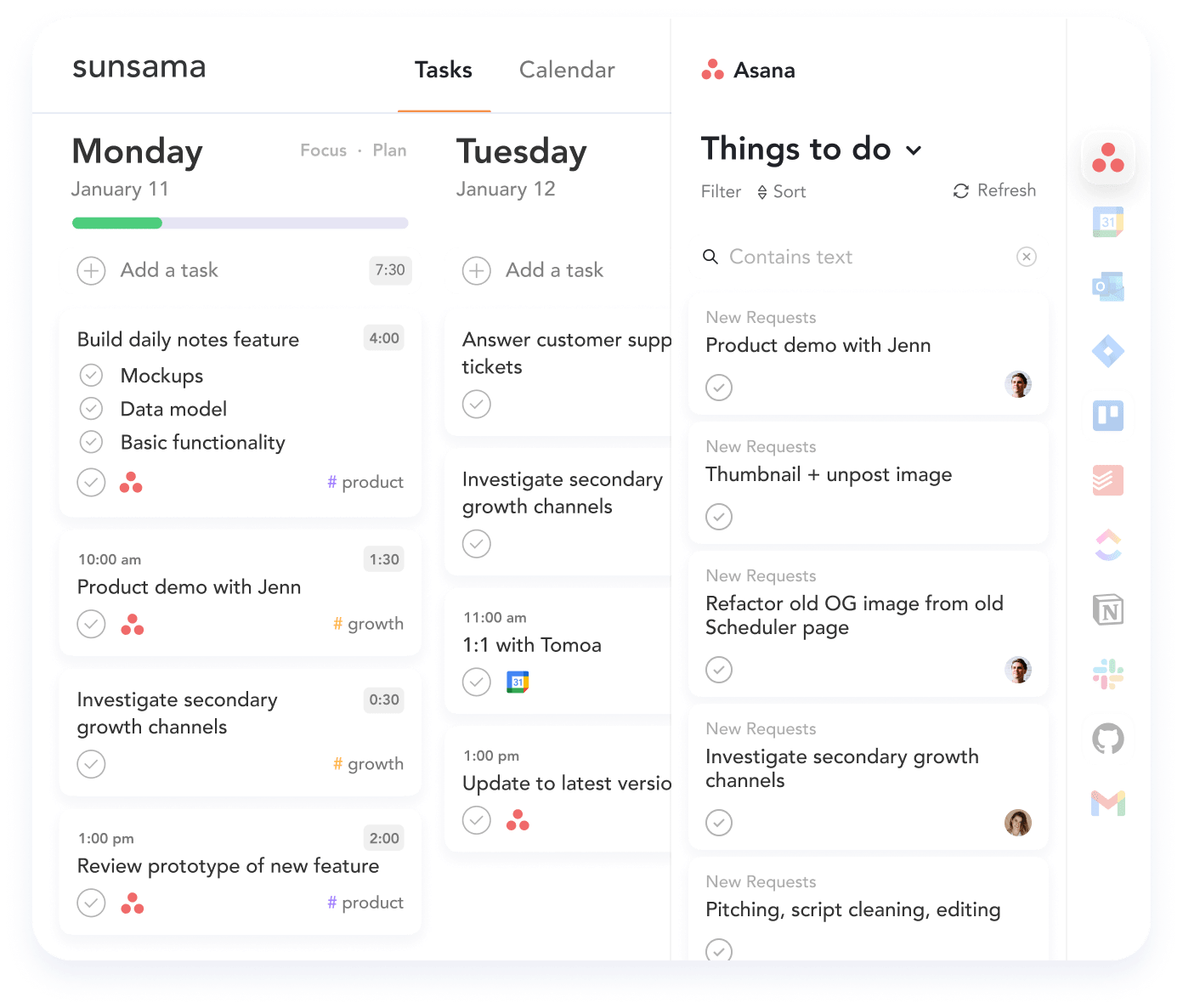
Sunsama connects to 20+ tools, including Gmail, Outlook, Slack, Asana, ClickUp, Todoist, Notion, Trello, Jira and Linear. You can drag an email straight onto today's list instead of starring it and forgetting it exists.
Timeboxing without building a calendar from scratch
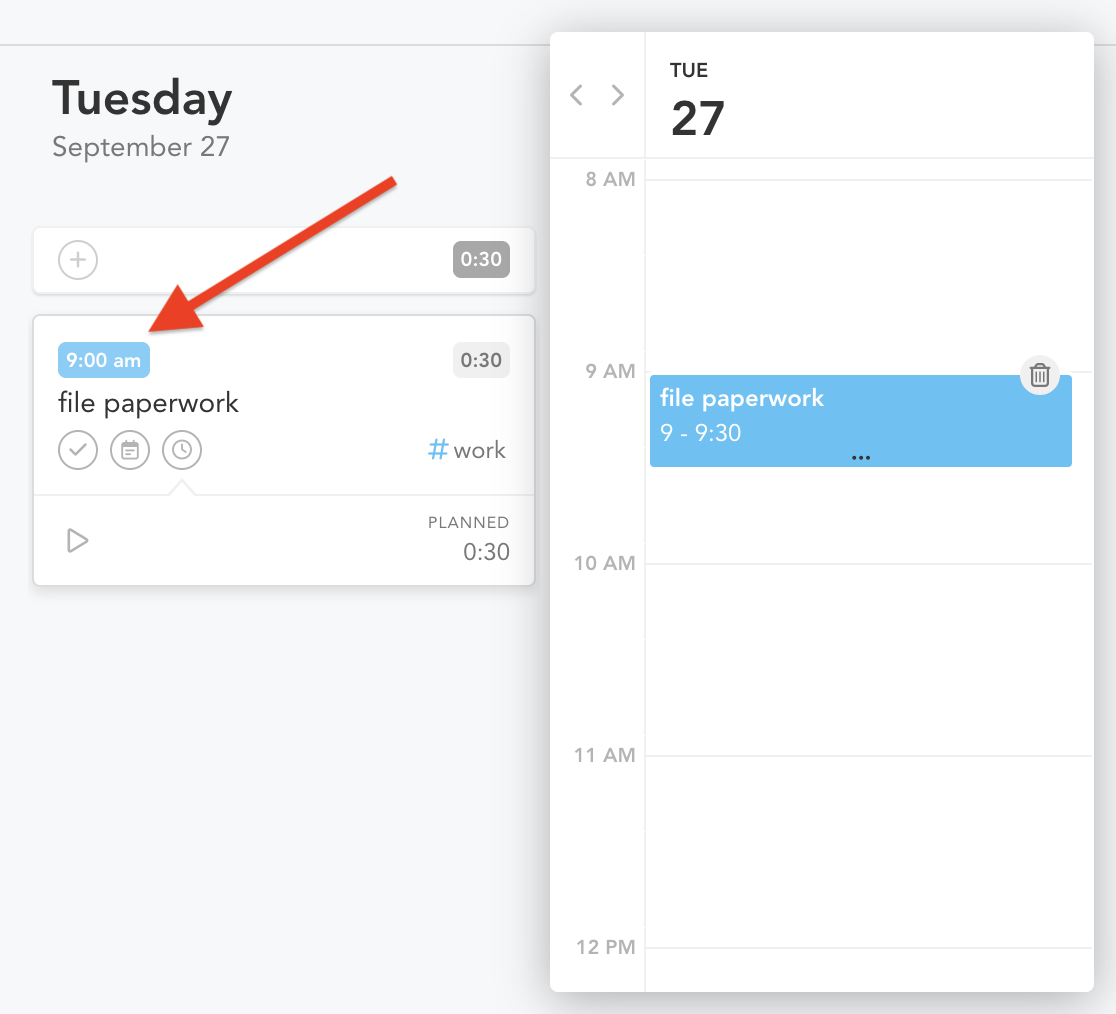
You drag a task onto a calendar slot and it becomes a block. That's it.
>> If you like the idea of time blocking with ADHD but hate building the blocks by hand, this removes most of the friction.
Rollover plus auto-archive stops the guilt pile
Unfinished tasks roll over to the next day at midnight. Leave one rolling for several days and Sunsama's auto-archive quietly moves it out of your list (rollover docs). You can change the threshold or turn it off. I like it on. A task that has sat there for a week is not getting done by staring at it harder.
What's new in Sunsama in 2026?
Sunsama has been shipping AI features all year. Per its changelog and AI page:
- Sunny, a built-in AI assistant, left beta in August 2026. You can ask it to create tasks, plan your schedule, sort your backlog or summarize what you finished last week (Sunny docs).
- AI time estimates based on how long your past tasks actually took. For time blindness, this is the most interesting update in years, because it swaps your guess for your history.
- Auto channel tagging so tasks get sorted into categories without you doing it.
- MCP support, also out of beta in August, so assistants like Claude Desktop can read and create Sunsama tasks.
The AI is useful, but it bolts onto a manual philosophy. Sunsama still expects you to do the planning. The AI helps you do it faster.
What does Sunsama cost, and is it worth it?
| Plan | Price | What you get |
|---|---|---|
| Free trial | $0 for 14 days | Everything, no credit card |
| Pro (monthly) | $22/month | Unlimited integrations, AI, MCP, Zapier |
| Pro (annual) | $17/month, billed yearly | Same as monthly, about 20% cheaper |
| Team | $25/person/month ($20 yearly) | Shared workspace |
So is it worth it? Divide $22 by the hours a month you currently lose to overplanning, redoing lists, and hunting for the thing someone Slacked you on Wed. If that's more than two hours, you're paying under $11 an hour to get them back. If you already plan fine and just need reminders, you're overpaying for a ritual you don't need.
One ADHD-specific warning: set a calendar reminder for day 12 of the trial.
Where Sunsama falls short for ADHD
The ritual is the product, and rituals break
Everything good about Sunsama flows from the morning planning session. On the days when you wake up in ADHD paralysis, the app has nothing to give you except a friendly screen asking you to plan. That's the moment you most need help and the moment it helps least.
It won't plan for you
Sunsama doesn't auto-schedule or decide your priorities. Sunny can help, but you're still the one making the calls. If decisions are what drain you, that's a real mismatch. Tools like Motion, or AI-first planners, take a different bet. We compared those in our best AI task manager for ADHD roundup.
No free plan
At $204 a year on annual billing, it's one of the pricier planners around. Compare that with Amazing Marvin, or Saner.AI which is far more customizable, or the options in our list of best free ADHD apps.
It's built for knowledge work
Sunsama is aimed at people with calendars full of meetings and tools full of tickets. If your life is laundry, school pickup and a part-time shift, you'll pay for integrations you never touch. A visual routine app like Tiimo fits that life better. Our Tiimo review covers that side.
Sunsama vs other ADHD planners: which should you pick?
| App | Best for | ADHD strength | ADHD weakness | Starting price |
|---|---|---|---|---|
| Sunsama | Overcommitters with desk jobs | Workload warning, shutdown ritual | Needs a daily ritual | $17/mo (annual) |
| Amazing Marvin | Tinkerers who want total control | Huge ADHD-friendly feature set | Setup can become procrastination | Paid, no free plan |
| Tiimo | Visual thinkers, routines at home | Visual timers, gentle structure | Light on work integrations | See our review |
| Motion | People who hate deciding | Auto-schedules your tasks | Plans shift constantly, can feel chaotic | Paid |
| Saner.AI | knowledge-heavy workers | Turns notes, braindump, tasks, inbox into a daily plan | Newer, smaller integration list | Free plan; paid from $8/mo |
For a wider look, see our best planner apps for ADHD adults
Saner.AI takes the opposite approach to Sunsama. Sunsama asks you to sit down and build the plan. Saner.AI reads your notes, email and calendar and drafts the plan for you, which you then edit. If the morning ritual is exactly what you can't sustain, that's the difference that matters. It also has a free plan, and paid plans start at $8 a month (Saner.AI pricing). If you love a slow, deliberate planning session, stick with Sunsama. If you want the draft done, try the other one.
Does a planning app actually help ADHD, or is that a myth?

No app treats ADHD. What the evidence supports is the skill behind these apps.
In a randomized trial of 88 adults with ADHD, a group program built around time management, organization and planning beat supportive therapy on inattention symptoms. 42% of the skills group met response criteria versus 12% of the comparison group (Solanto et al., 2010, American Journal of Psychiatry). The detail I find most useful: completing the home exercises predicted who improved.
So the popular idea that the right app will fix your executive function is backwards. Practice does the work. An app like Sunsama is useful only because it makes the daily practice harder to skip. If you're considering medication, therapy, or coaching, that's a conversation for your clinician, not a software checkout page. See our medical disclaimer.
How to set up Sunsama for ADHD in 20 minutes
- Connect only two sources. Your calendar and the one tool where most tasks live. Adding all 20 integrations on day one is how you end up with a 300-item backlog and a nap.
- Set your workload threshold low. Start at 5 hours, even if your job is 8. Meetings count against your day in real life, so let them count here.
- Set a shutdown time and let Sunsama create the calendar event. Pick a real time. 5:30, not "whenever."
- Estimate every task, badly. Bad estimates are fine. The AI estimates improve as it sees your actual history, and you'll learn your own padding factor (mine is roughly 1.5x).
- Pick three tasks max for the first week. Everything else goes to the backlog. Yes, really.
- Put the planning ritual somewhere it can't hide. Tie it to something you already do, like the first coffee. We cover the method in habit stacking with ADHD.
- Turn on auto-archive. Default threshold is fine.
- Write a "bad day" plan. One task. Five minutes. On a paralysis day, open Sunsama, drag in that one task, start the timer. Done counts.
Bonus: do a Friday check using your weekly objectives. Our guide on how to plan a week with ADHD walks through a 15-minute version.
Who should use Sunsama, and who should skip it?
Get Sunsama if you:
- Plan too much and then feel crushed by the list
- Juggle tasks across email, Slack and a project tool at work
- Have 10 minutes most mornings and can protect them
- Want a firm end to your workday
Skip Sunsama if you:
- Need the app to decide for you
- Mostly manage home life, school or routines
- Are on a tight budget (try the free tiers elsewhere first)
- Already know you abandon any app that asks something of you each morning
FAQ
Is Sunsama good for ADHD?
Sunsama is good for ADHD adults whose main problem is overcommitting at work. Its workload warning and shutdown ritual help with time blindness and overwork. It's a weaker fit if you need the app to make decisions for you, since planning is still manual.
Is Sunsama free?
No. Sunsama has no free plan. It offers a 14-day free trial with no credit card, then costs $22/month or $17/month billed yearly.
Does Sunsama use AI?
Yes. Sunsama has an AI assistant called Sunny, AI time estimates based on your past tasks, automatic channel tagging, and MCP support so assistants like Claude can connect to it.
Can Claude connect to Sunsama?
Yes. Sunsama's MCP integration came out of beta in August 2026, which lets MCP-compatible assistants like Claude Desktop read and create tasks.
Does Sunsama have a mobile app?
Yes. Sunsama runs on iOS and Android, plus macOS, Windows, Linux and the web. Planning is easiest on desktop.
What's the best Sunsama alternative for ADHD?
It depends on the gap. Amazing Marvin for customization, Tiimo for visual routines, and Saner.AI if you want an automatic daily plan. Our best ADHD task management apps list compares more.
The bottom line
Sunsama won't fix ADHD. It will tell you, every single morning, that you planned too much.
Here's what to do today:
- Start the 14-day trial and set a reminder for day 12
- Connect your calendar plus one task source, nothing else
- Set a 5-hour workload threshold and a real shutdown time
- Plan three tasks tomorrow morning, with the coffee
- On day 12, count how many mornings you actually planned. Eight or more? Keep it. Under five? Try a tool that plans for you instead.
This article is for information only and isn't medical advice. Read my editorial policy for how we test tools.