Real Tiimo Review: Here's the Honest Verdict.

How I came up with this review
I used Tiimo daily for three weeks on iPhone and the web planner, on Pro. I tracked three things every day: whether I opened the app without being prompted, how many times the AI Co-planner's first suggestion needed editing, and whether I missed anything I'd scheduled in it. I also read through a stack of App Store reviews to check my experience against other users' and a professional's. That's the whole methodology.
What Tiimo is
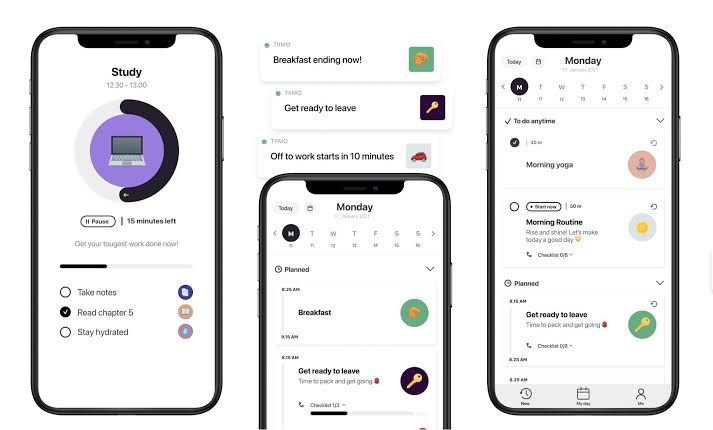
Tiimo turns your day into a picture instead of a list. Every task gets an icon and a color, laid out across a circular or linear timeline, so you see a purple block sitting between two other blocks, with a bar draining as the meeting happens.
It was built for ADHD and autistic users specifically. The team is based in Copenhagen
Why a visual timeline helps an ADHD brain
- Time blindness. Dr. Russell Barkley's research directly compared adults with ADHD to controls on time estimation and reproduction tasks. The ADHD group overestimated longer time intervals and made significantly larger errors reproducing set durations (Barkley, Murphy & Bush, 2001, Neuropsychology).
- This isn't a one-off finding. A 2023 review covering a decade of research on adult ADHD confirms consistent, measurable impairments in time perception and time reproduction across multiple studies, not just Barkley's original sample (Time Perception in Adult ADHD: Findings from a Decade — A Review, PMC).
Tiimo featured, broken down
Visual Schedule Planner. The core of the app. Color-coded blocks laid across a timeline, dragged and dropped to adjust. You pick or customize an icon for each activity type, so "gym" always looks the same at a glance and you're not reading text to know what's coming.
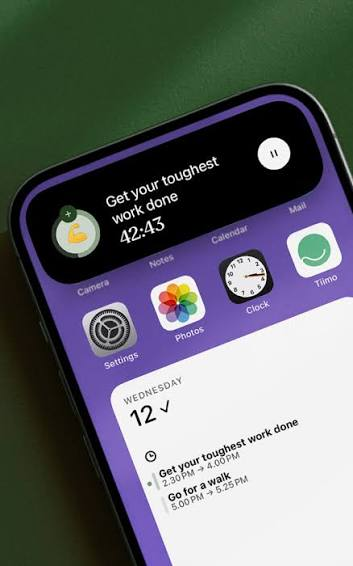
Now-and-next widget. It shows only your current block and the one immediately after it, not your whole day. Sits on your home screen or lock screen. On supported iPhones it also runs as a Live Activity in the Dynamic Island, so the current task is visible without unlocking your phone at all.
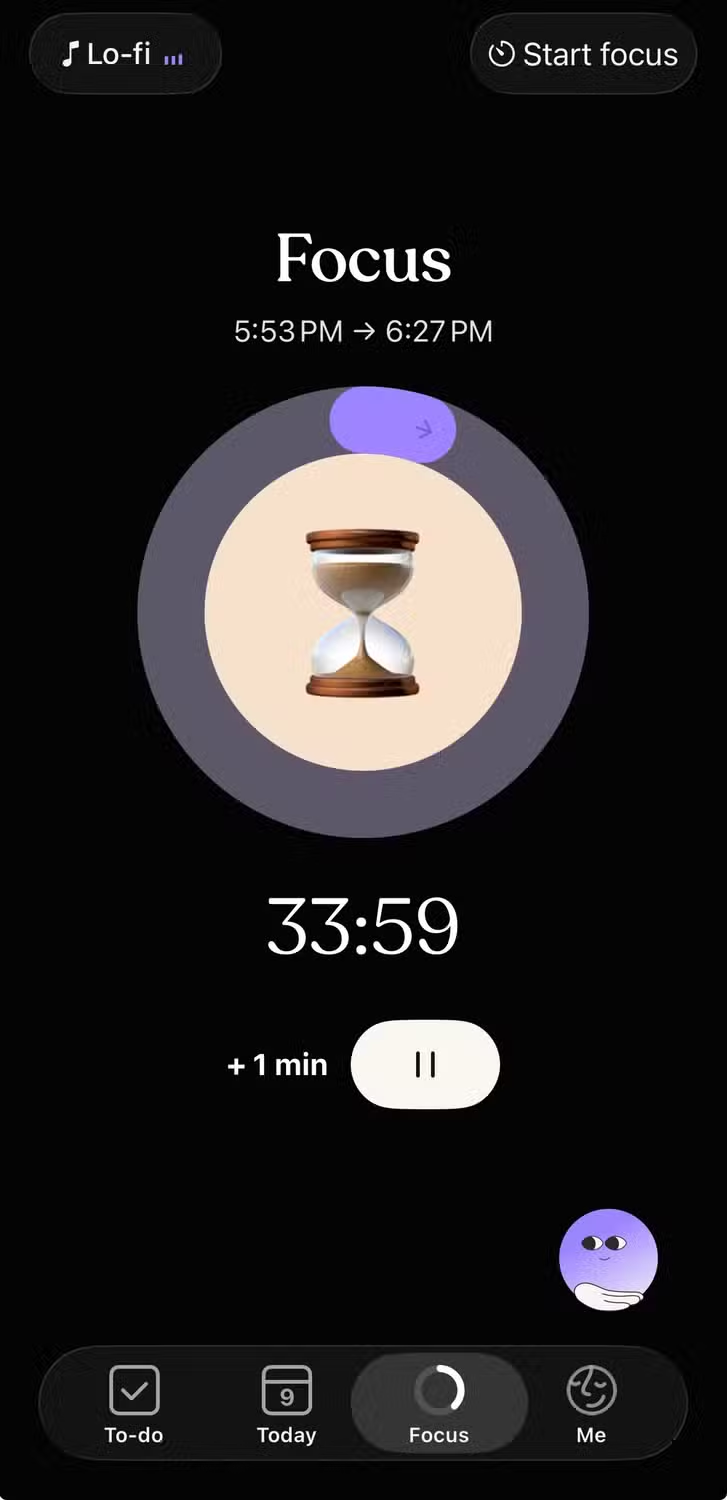
Focus Timer. A calming Pomodoro-style countdown, explicitly designed to combat what Tiimo calls "time agnosia." No jarring alarm at the end, a gentle wind-down instead.
AI Co-Planner. Suggests, prioritizes, and helps break down tasks based on your existing routines. It's a starting point, not an oracle. I edited its first suggestion roughly half the time across my three weeks.
Routines and templates. Build a routine once (a morning sequence, a wind-down sequence) and reuse it instead of rebuilding your day from scratch every morning. This alone cut my daily planning time by more than half.
Calendar import. You can pull in Google, iCloud, and Outlook calendars. Important caveat: this is largely a one-way import, not full two-way sync. Events show up in Tiimo, but changes you make inside Tiimo don't reliably push back to your original calendar. This is a common complaint in App Store reviews, and I ran into it myself when I moved a synced event and it didn't update on the Google Calendar side.
Platforms. iPhone, iPad, Mac, Apple Watch, Android, and a web planner (Pro only). Apple Watch support includes quick task adds and viewing today's plan from your wrist.
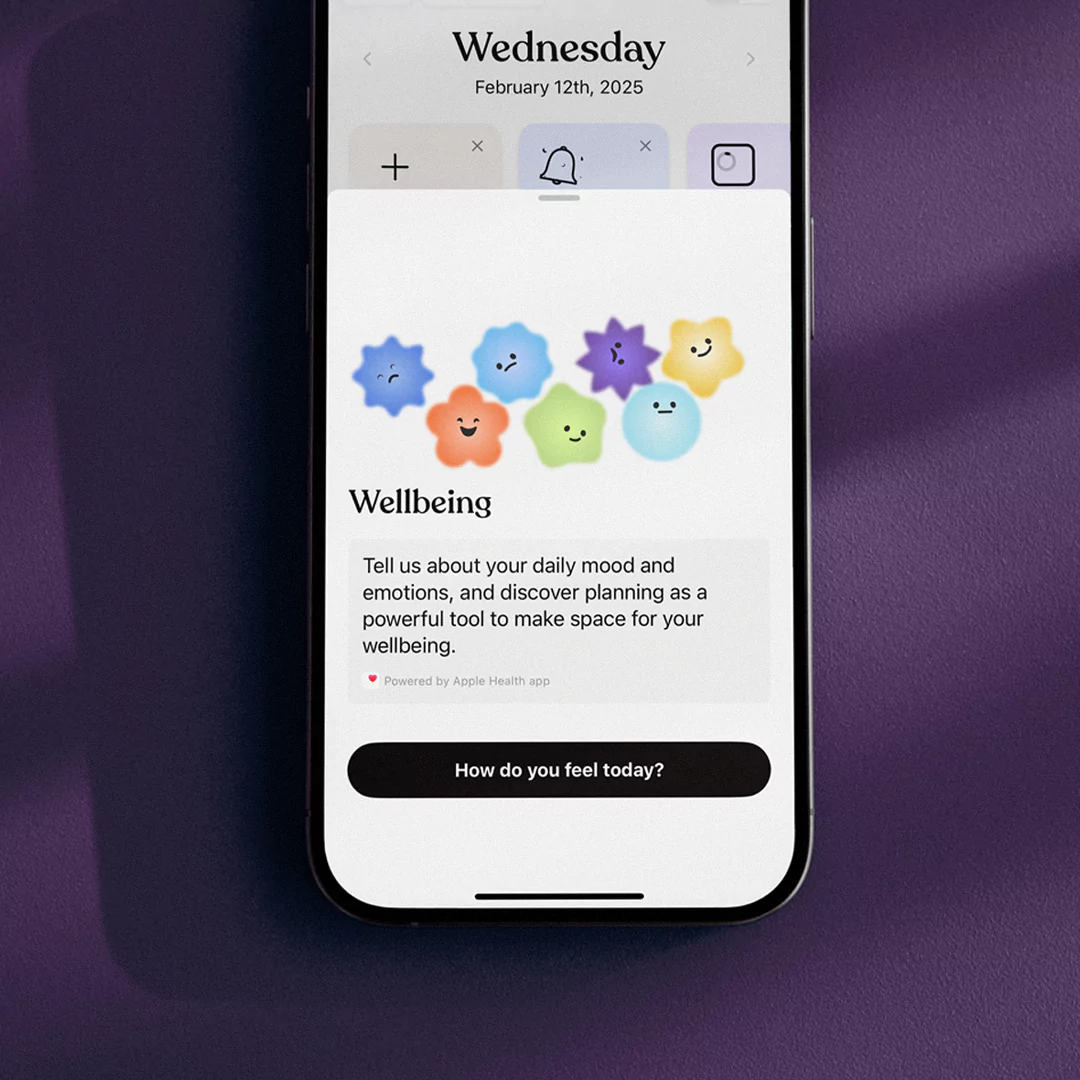
Mood check-ins. A lighter feature for tracking how your day felt, meant to build emotional awareness alongside the scheduling side. I used this inconsistently and can't speak strongly to its value either way.
What using Tiimo day-to-day is actually like
Setup took about 40 minutes the first time, building routines and picking icon sets. Worth it, but don't start this five minutes before you need to plan tomorrow morning.
The now-and-next widget solved a real problem for me: opening a calendar app and immediately closing it again because seeing eleven hours mapped out at once was its own kind of overwhelming. Seeing only "now" and "next" removed that wall entirely.
Transitions are gentle rather than alarming. Instead of a jarring cutoff alert, you get a nudge before the switch. That mattered more than I expected, especially on days I'd hyperfocused into something and needed a soft off-ramp rather than a hard stop.
Where it frustrated me: the calendar sync issue above bit me twice in three weeks, and building out a full week of routines on the free mobile-only tier isn't realistic if you also want the web planner for actual desk work.
What Tiimo costs
- Free: mobile only, covers the core planner, a basic to-do list, and one profile, plus limited AI chats
- Pro: $7.99/month or $79.99/year (saves about $16/year), unlocks the web planner, the full AI Co-planner, and complete widget access. Yearly plans come with a 7-day free trial
- Family: $119.99/year for up to 5 people, sharing routines and profiles at no extra per-person cost, one of the few neurodivergent-focused apps offering a real household plan
The free tier is usable if you're mobile-only and don't need AI features. Want the web planner or want the AI actually building your schedule? You're paying.
Where Tiimo delivers
- Makes time visible in a way a text calendar can't, directly addressing the time-blindness research above
- The now-and-next view and Live Activity support solve the "opening my calendar is its own overwhelming task" problem
- Transition nudges instead of jarring alarms
- Routine templates mean you're not rebuilding your day from scratch every morning
- Real accessibility support (VoiceOver, voice control, text scaling, dark mode), not a token gesture
- Built specifically for ADHD and autistic brains, co-designed with the communities it serves, rather than retrofitted from a neurotypical tool
- Genuinely ad-free, permanently
Where Tiimo falls short
- Day-planning only. No real project management depth if that's what you need
- Calendar sync is one-way import, not true two-way sync. Edits in Tiimo don't reliably push back to Google or Apple Calendar
- Full functionality requires Pro. The free tier is a taste, not the product
- Icon-first, playful visual style might feel like a mismatch if you work somewhere buttoned-up and check your calendar in shared meetings
- The AI Co-planner needs editing more often than I'd like
- iCloud calendar import currently isn't available on Android
Who should get it, and who should skip it
Get it if your main problem is time blindness or you shut down when a day looks too full at a glance. Also solid if you've bounced off traditional planners because dense text lists just don't compute for your brain the way a picture does, or if accessibility features are a real requirement rather than a nice-to-have.
Skip it if you're managing complex, multi-week projects (pair it with something built for that instead), if two-way calendar sync is a hard requirement for your work setup, or if a completely free tool is non-negotiable, since the features that make Tiimo worth talking about live behind Pro.
Tiimo alternatives
Here's what most "Tiimo alternatives" posts get wrong: they compare it against other visual planners and call it a day. The honest comparison depends on which problem you're solving. If it's task initiation specifically, I've written a whole breakdown of that problem separately.
| Tool | Best for | Price | How it differs from Tiimo |
|---|---|---|---|
| Tiimo | Visual time-blindness, gentle daily structure | $7.99/mo, free tier (mobile) | The benchmark for visual day-planning |
| Saner.ai | People drowning in scattered notes, tasks, and email who want AI to organize it for them | Free tier, paid plans roughly $8–12/mo (check current pricing, it's moved a few times this year) | Different category entirely. Tiimo shows you your day. Saner.ai's AI assistant (Skai) reads your notes, emails, and calendar and auto-organizes and prioritizes for you, so it's less "look at your timeline" and more "stop having to build the timeline yourself." Deeper comparison in my AI task manager review |
| Structured | Simpler visual timeline, minimal setup | One-time or low subscription | Less routine automation, more bare-bones |
| Sunsama | Guided daily planning rituals for people juggling work across multiple tools | ~$20/mo | Built for knowledge workers coordinating Slack, email, and tasks, heavier and pricier |
| Goblin Tools | Breaking one overwhelming task into steps, free | Free | Not a planner at all, a task-breakdown tool. I reviewed it here |
If you want the fuller list, I ranked the 5 best ADHD task management apps and separately the 5 best planner apps for ADHD adults, and Tiimo and Saner.ai both show up, in different categories, because they're not really solving the same problem.
FAQ
Is Tiimo actually designed for ADHD, or just marketed that way?
It's designed for it, co-designed with input from ADHD and autistic communities. The visual timeline, gentle transitions, and now-and-next view all map directly onto documented ADHD time-perception research, not just marketing language.
Is Tiimo worth paying for?
If the free tier's mobile-only limitation doesn't bother you and you don't need the AI Co-planner, you can get real value for free. If you want the web planner or want it to help build your schedule, yes, Pro is worth the $7.99.
Does Tiimo sync both ways with Google Calendar?
No, and this trips people up. It imports your existing calendars into its view, but edits made inside Tiimo don't reliably push back out. If two-way sync is a dealbreaker for your workflow, budget time to test this before committing to the yearly plan.
Can Tiimo replace my work calendar?
Not fully. It's excellent for personal daily structure. For team scheduling or shared calendars, Google Calendar performs better, and plenty of people run both side by side.
Is Tiimo accessible if I'm not a visual thinker, or have low vision?
Better than most apps in this category. It supports VoiceOver with braille and speech output, full voice control, text scaling to 200%+, and a dark mode. That said, the core product is fundamentally visual, so if visual processing itself is the barrier rather than screen size or contrast, it may not be the right fit regardless of accommodation features.
Bottom line
Tiimo does one thing and does it well: it makes time something you can see instead of something you have to feel, which matters if your brain's internal clock runs on its own schedule.
It won't replace a full planning system if your ADHD problem is bigger than daily time-blindness, and the calendar sync limitation is worth testing before you commit to a year.
👉 For the bigger picture, start with my complete guide to ADHD productivity.