Saner.ai vs Motion for ADHD: Which AI Planner Fits Your Brain?

Same dream, two apps. The dream: you stop deciding what to do next, and an AI decides for you. For an ADHD brain that spends half its morning negotiating with a to-do list, that pitch is so relevant

They get there in very different ways. Motion is a scheduling engine: it takes your tasks and packs them into your calendar, minute by minute. Saner.ai is closer to an assistant: it reads your email, notes and calendar, pulls out what you promised people, and drafts a plan you can talk to.
The quick answer: Saner.ai vs Motion for ADHD?
Pick Motion if your days are packed with deadlines, you already put tasks in with durations, and you want software to block every hour on your calendar and rebuild it when things slip. You'll pay for it, and you need guardrails so it doesn't pack your day to the ceiling.
Pick Saner.ai if your tasks are hiding in your inbox, notes and in your head, you freeze when a schedule turns red, or you want a free or cheap way to get a daily plan. It suggests a plan and nudges you. It doesn't run your calendar like an air traffic controller.
Pick neither if you mainly need a simple list and reminders without AI. A plain task app will do, and our guide to the best AI task manager for ADHD covers lighter options.
| Saner.ai | Motion | |
|---|---|---|
| Core idea | AI assistant that finds tasks and drafts your day | AI scheduler that time-blocks your calendar |
| Where tasks come from | Email, notes, calendar, chat, voice | You enter them (with duration, priority, deadline) |
| Plans your day | Yes, suggests a plan you edit by chatting | Yes, places every task into a calendar slot |
| Auto-reschedules missed work | No full auto-scheduling engine | Yes, its main feature |
| Notes built in | Yes | Docs, but notes aren't the focus |
| Free plan | Yes | No, free trial only |
| Paid price | $8 or $16/month | From $49/seat/month; individual plans cost more |
| Best ADHD strength | Catching commitments you forgot you made | Killing the "what do I do now?" decision |
| Biggest ADHD risk | You still have to choose when to do things | Overpacked days and guilt-red overdue tasks |
What problem are you actually trying to solve?
This is the question that decides it, so let's start here instead of with feature lists.
ADHD planning problems usually fall into one of three buckets:
- "I forgot I said I'd do that." The task never made it onto a list. It's in an email thread, a Slack message, or a meeting you half-listened to.
- "I have the list. I don't know what to do first." Everything looks equally urgent, so nothing happens. Hello, ADHD paralysis.
- "I planned the day and the day laughed at me." Something took three times longer than expected, and the whole plan fell apart by 11am.
Saner.ai is built mostly for bucket 1, 2, 3. Motion is built for buckets 2 and 3.
There's research behind why bucket 1 is such a big deal. In a 2019 study, Mareike Altgassen and colleagues found adults with ADHD did about as well as controls on lab memory tasks with clear prompts. In daily life it was another story. When asked to phone the researchers at a set time, 52% of the ADHD group never called on time, versus 21% of controls, and they carried out fewer of their own everyday intentions (Altgassen et al., 2019).
Bucket 3 has research too. A 2023 review by Christian Mette concluded that time perception is impaired in adult ADHD, though studies on time estimation specifically were mixed (Mette, 2023). >> some of us are wildly off when guessing how long things take, and some of us aren't.

How does Motion work for ADHD?
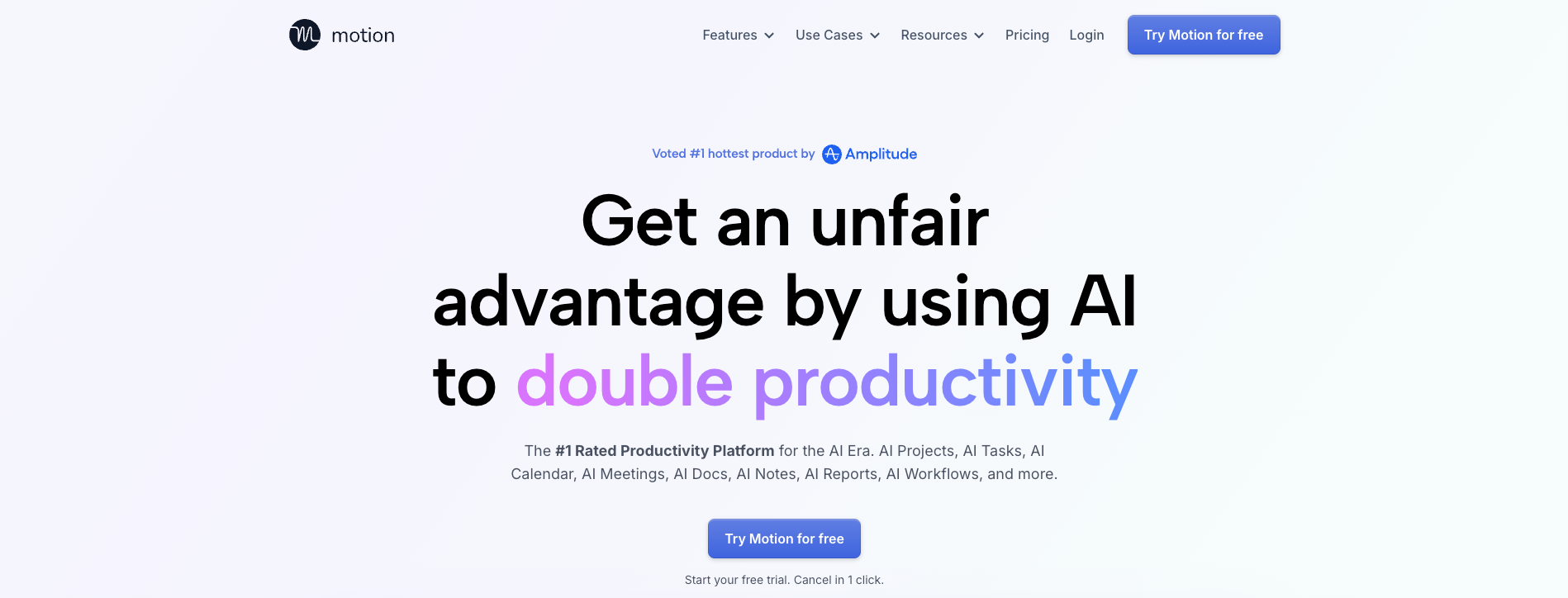
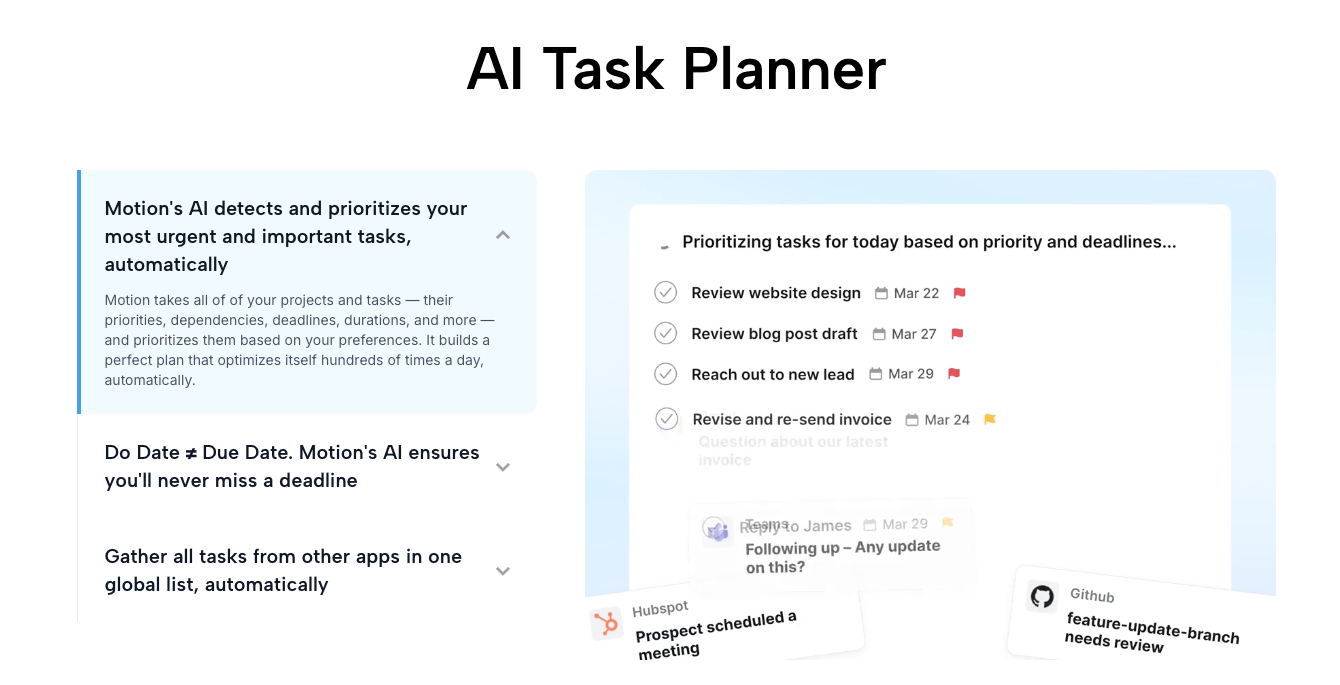
Motion takes a task with a duration, a priority and a deadline, then finds a slot for it in your calendar.
- It works around existing events marked Busy.
- Hard deadlines get scheduled first, and Motion will book time outside your working hours to meet one.
- ASAP tasks jump the queue. After that it's High, Medium, Low, weighed against due dates.
- Long tasks can be chunked into smaller blocks, like a 6-hour project split into three 2-hour sessions.
- You can set focus windows, such as deep work in the morning and meetings in the afternoon.
When something runs over, Motion recalculates and pushes things around.
Where Motion shines for ADHD
- No more "what now?" You open your calendar and the next block is just there.
- Time becomes visible. Seeing that your "quick" tasks add up to nine hours is humbling. Useful, but humbling. It's a concrete fix for ADHD time blindness.
- The plan heals itself. Missed a block? It moves. No manual rescheduling spiral.
Where Motion hurts
I covered this in depth in my Motion review for ADHD, but the short version:
- It packs days tight. Motion fills gaps by default. ADHD days need slack, because something will go sideways. Something always goes sideways.
- Red warnings. Tasks that can't meet their deadline get flagged. For some people that's motivating. For anyone prone to avoidance, it's a reason to never open the app again.
- Bad estimates break it. If you think the report takes 45 minutes and it takes 3 hours, the whole schedule is fiction. Garbage durations in, garbage calendar out.
- You still do the capture. Motion schedules what you give it. If the task is buried in an email from Tuesday, Motion has no idea it exists.
- Price. There's no free plan. If you've got a history of abandoned subscriptions (the classic ADHD tax), test it inside the trial window and set a reminder to cancel.
- Also, the founders of the company have moved their focus to another new business. So no new update.
How does Saner.ai work for ADHD?
Saner.ai starts at the other end of the problem. It connects to Gmail, Google Calendar and Google Drive, and its homepage also lists Slack. Then it does three main things, according to Saner's own getting-started guide:
- Inbox triage. Incoming items, especially emails, land in an inbox where the AI suggests an action, a folder and tags. You apply, edit or skip.
- An AI day plan. The Home screen shows a plan built from your synced sources: urgent items, high-priority tasks and some quick wins. You adjust it by chatting with the assistant in a side panel.
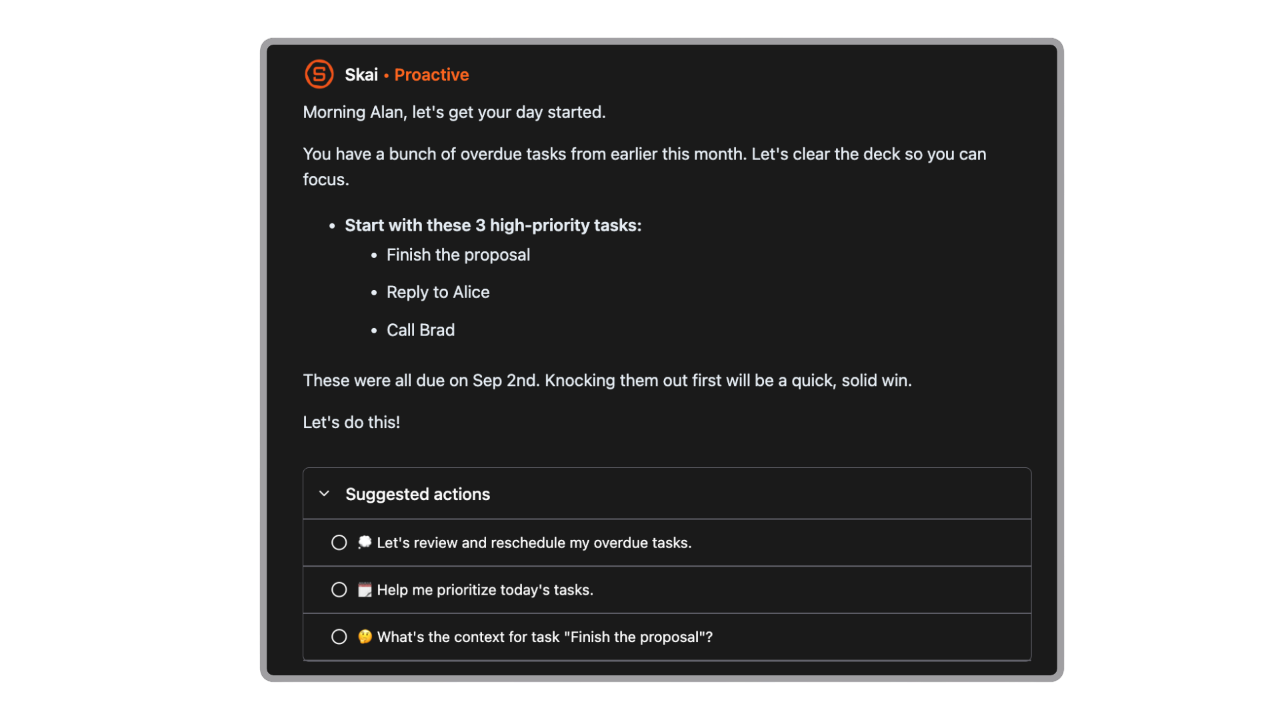
- Nudges and a nightly review. You can turn on reminders and AI nudges, and an end-of-day review shows what got done, what's pending and what's coming.
Tasks can sync to Google Calendar if you want them there. Notes live in the same app, so meeting notes and the tasks inside them aren't split across two tools.
Where Saner.ai shines for ADHD
- It catches the stuff you forgot you agreed to. For bucket-1 problems, this is the key. If your inbox is where tasks go to die, having something pull them out matters more than a perfect calendar.
- Brain dumps have somewhere to go. Type or talk a messy ADHD brain dump into chat and ask for it to be turned into tasks.
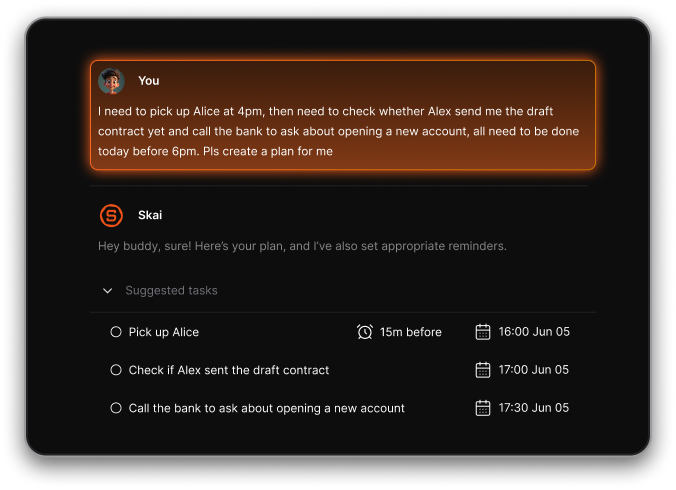
- Gentler tone. It suggests a plan. You can push back in plain English: "I'm wiped, give me three easy things." No red wall of shame.
- Cheap to try. There's a free plan, and paid tiers are $8 and $16 a month.
Where Saner.ai falls short
- Fewer project-management features. Motion has project templates and per-seat team plans. Saner is built around one person's day. If you run multi-week projects with other people, Motion covers more.
- It's newer. Some features are still rolling out.
Saner.ai vs Motion: head-to-head for ADHD problems
Here's how the two compare, one ADHD problem at a time.
Which is better if you forget commitments?
Saner.ai. Easy one. Motion can only schedule what you type into it. Saner goes looking in your email and notes. If your failures are mostly "oh no, that was due yesterday," start here.
Which is better if you freeze at a long list?
Both help. Motion's calendar hides the list completely: you see one block at a time. Saner also helps here by shrinking your day to a short suggested plan
Which is better when your day falls apart?
Motion. narrowly. Automatic rescheduling is its core feature. With Saner you'd ask the assistant to re-plan, which works
Which is better if overdue warnings make you avoid the app?
Saner.ai. Motion's red flags work for some people and backfire hard for others. If you've ever ignored an app because opening it felt like reading a bank statement after a holiday, the softer approach is safer.
>> This matters double if you're running on fumes; see our guide to ADHD burnout.
Which is better for automatica time blocking?
Motion. It is a time-blocking engine. If you like time blocking with ADHD but hate doing it by hand, Motion automates the boring part.
Which is better on a budget?
Saner.ai. It has a free plan and the paid plans cost less than Motion's cheapest seat. Motion has no free tier.
Which is better for notes and meetings?
Saner.ai. Notes, tasks and chat live together. Motion has docs and a meeting notetaker, but its center of gravity is the calendar.
A two-week test to pick between Motion and Saner.AI
Don't take my word for it (especially given the disclosure). Test them against your actual week.
Week 1: Saner.ai (free plan)
- Connect Gmail and Google Calendar. Start with only the labels you care about.
- Each morning, open the Home day plan. Ask the assistant to cut it to your top 3.
- Every time you remember a task, dump it into chat instead of a sticky note.
- On Friday, count: how many tasks did it surface that you'd otherwise have missed?
Week 2: Motion (free trial)
- Set a calendar reminder to cancel before the trial ends. Do this first. Really.
- Set working hours that end an hour earlier than your real ones. That's your slack.
- Add only this week's real tasks, each with a duration. Pad every estimate by 50%.
- Turn on chunking for anything over an hour.
- On Friday, count: how many scheduled blocks did you actually do in their slot?
Then decide:
- More tasks rescued in week 1 → Saner.ai.
- More blocks completed in week 2 → Motion.
- Both low → your problem is probably starting, not planning.
Our guides on using AI to break down tasks and planning a week with ADHD are better next steps than another app.
Can you use Saner.ai and Motion together?
You can. Should you? Maybe. Saner finds and organizes tasks, Motion schedules them. In practice, two AI tools means two subscriptions, two inboxes and a fair chance you forget which one holds what. Pick one. Most of us can't babysit two.
The exception: heavy-meeting jobs where tasks arrive by email all day and your calendar is a game of Tetris. If that's you, the combo can earn its keep. Just set one rule: tasks are born in Saner, scheduled in Motion, and never typed into both.
What about other options?
If neither fits, the AI planner category is crowded. Our roundup of the best AI calendars for ADHD compares more AI scheduling tools. If you'd rather have a visual day planner than an AI one, see the best planner apps for ADHD adults.
My take
If I had to bet for a typical adult with ADHD and an office job, I'd start with Saner.ai. Most of the planning failures I see start before planning: the task never got written down. Saner attacks that, it's cheap to try, and it won't shame you.

The exception is the deadline-heavy person who already captures well and just can't sequence the day. For that person, Motion is the stronger tool. Watching it rebuild a broken afternoon in two seconds is a small miracle. Just give it slack and padded estimates, or it'll plan your day like you're a robot who never needs lunch.
Your action steps for today
- Name your bucket: forgetting commitments, freezing at the list, or plans collapsing.
- Bucket 1 → sign up for Saner.ai's free plan and connect your email.
- Buckets 2 or 3 → start Motion's trial, and set the cancel reminder right now.
- Whichever you choose, pad today's time estimates by 50%.
- Book a 10-minute check-in with yourself next Friday to decide if it stays.
FAQ
Is Saner.ai or Motion better for ADHD?
It depends on where your planning breaks. Saner.ai is better if you forget commitments buried in email and notes, want a gentle tone, or need a free or cheap option. Motion is better if you need software to time-block your whole calendar and reschedule automatically when things run late.
Does Saner.ai auto-schedule tasks like Motion?
Not in the same way. Saner.ai drafts a daily plan from your email, notes and calendar, and you adjust it by chatting with the assistant. It can sync tasks to Google Calendar. It doesn't continuously place and re-place every task into calendar slots the way Motion's auto-scheduler does.
Is there a free version of Motion?
No. Motion offers a free trial but no free plan. Saner.ai has a free plan
How much does Motion cost compared with Saner.ai?
Motion's pricing page lists plans from $49 per seat per month. Saner.ai is free, $8/month or $16/month. Prices change, so check both pricing pages.
Can an AI planner treat ADHD?
No. AI planners are organizing tools. Standard ADHD treatments are medication and psychosocial interventions such as cognitive behavioral therapy (NIMH). A planner can support that by providing outside structure and reminders. Talk to a clinician about treatment.
Which is better for people who hate rigid schedules?
Saner.ai. Motion's strength is a tightly managed calendar, which feels like a cage to some people with ADHD. Saner suggests a plan and lets you renegotiate it in plain language.
Sources
- Altgassen, M., Scheres, A., & Edel, M.-A. (2019). Prospective memory (partially) mediates the link between ADHD symptoms and procrastination. ADHD Attention Deficit and Hyperactivity Disorders, 11, 59–71.
- Mette, C. (2023). Time Perception in Adult ADHD: Findings from a Decade. A Review. International Journal of Environmental Research and Public Health, 20(4), 3098.
- National Institute of Mental Health. Attention-Deficit/Hyperactivity Disorder.
- Motion. Pricing and Auto-scheduling help article.
- Saner.ai. Pricing and Getting started with Saner.AI.
- Morgen. Motion pricing plans in 2026 (April 30, 2026).
This post is for information only and isn't medical advice. See my medical disclaimer.