How to Build a Second Brain With ADHD That You'll Use

The short answer
A second brain for ADHD is one trusted place outside your head where thoughts land fast, get sorted later, and come back to you when you need them. Not a beautiful knowledge garden. A catch-all that does the remembering so your actual brain can do the thinking.
If you only take one thing from this post: capture has to take under five seconds, and sorting has to happen later, on a schedule.

Here's what's in this guide:
- Why ADHD brains drop things
- The four parts every working second brain has
- A 30-minute setup you can do today
- Real workflows
- Which app to use
Why your brain keeps dropping things
Working memory is smaller. A 2018 review that pooled 34 meta-analyses found working memory was among the areas with the largest gaps between people with ADHD and controls (Archives of Clinical Neuropsychology, 2018).
Planning to remember is the hard part. In a study of 45 adults with ADHD, the trouble with remembering future tasks came mainly from weaker planning, not from forgetting the plan itself (Fuermaier et al., PLoS ONE, 2013).
Your mind wanders more, and less on purpose. Researchers have described ADHD mind-wandering as frequent, unintended and often unnoticed, with thoughts that jump between unrelated topics (Bozhilova et al., Neuroscience & Biobehavioral Reviews, 2018).
>> If forgetting is your biggest problem, my post on ADHD forgetfulness goes deeper on the day-to-day side.
Why the classic "second brain" advice breaks for ADHD
Tiago Forte popularised the idea, and his PARA method is solid. But most second-brain content is written for people who enjoy maintaining systems.
ADHD versions tend to fail in four predictable ways:
- The setup becomes the project. You spend a Saturday hyperfocused on templates, colour-coded tags and a dashboard. By Wednesday you've stopped opening it.
- Capture has too many decisions. "Which folder? Which tag? Is this a project or a resource?" Each question is a tiny wall. The thought is gone before you climb it.
- Out of sight, out of mind. Notes go in and never come back out. A second brain you never see is a very organised landfill.
- Too many inboxes. Notes app, email drafts, screenshots, three Notion pages, a paper notebook, texts to yourself. Nothing is trusted because nothing is complete.
The four parts of an ADHD second brain
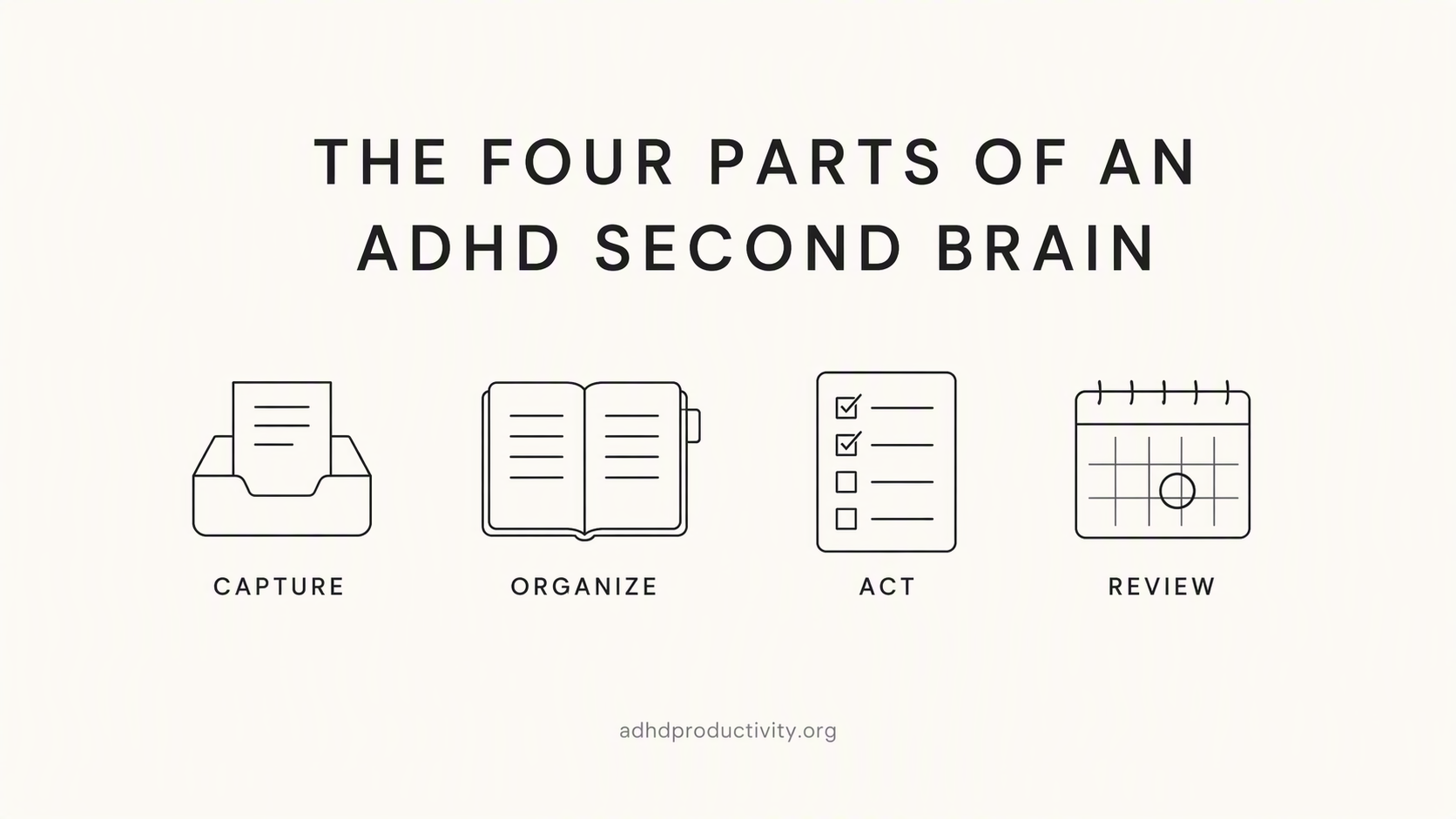
1. Capture (under 5 seconds)
One inbox. Everything goes there first. No sorting, no formatting.
- A home-screen widget or shortcut on your phone
- A keyboard shortcut on your computer
- Voice capture for when your hands are busy (our voice-to-text tools roundup has options)
- A browser extension for links and articles
2. Sort (later or optional)
Sorting is a separate job. Do it once a day for five minutes, not every time you capture. Or you can use an app that organize for you like saner.ai
If you want to do it for yourself. Use a stripped-down version of PARA:
- Projects: things with a finish line ("Plan Sam's birthday", "Q4 report")
- Areas: ongoing responsibilities with no finish line ("Health", "Money", "Team")
- Resources: stuff that's just interesting or useful ("Recipes", "Article ideas")
- Archive: anything done or dead
If four folders still feels like too many, start with two: Active and Someday. Seriously.
3. Resurface
Your second brain has to come and find you. Otherwise you're relying on remembering to check it, which is the exact thing you built it to avoid.
Ways to make notes come back:
- Pin your current projects to the top of the app
- Turn tasks into reminders with a time attached
- Use an app that shows related old notes when you write a new one
- Put a daily note on your phone's home screen
4. Review

- Daily, 5 minutes: empty the inbox. Each item gets moved, turned into a task, or deleted.
- Weekly, 15 minutes: look at Projects. Archive anything finished. Pick the 3 that matter this week.
Pair the weekly review with your planning session. My guide on how to plan a week with ADHD has a template
Real workflows with the second brain

The random idead
- Phone widget → voice note: "Idea: newsletter about lunch breaks"
- Back to sleep
- Next day's 5-minute review: move it to Resources → "Article ideas"
The meeting you'll forget
- During the meeting, one rough note in the Inbox. Bullets only.
- Right after, highlight anything with a verb and a person ("I send deck to Priya")
- Turn each of those into a task with a date
- Move the note into the matching Project
If meetings are a regular struggle, meetings with ADHD has more on staying present without losing the details.
"Where did I save that link?"
- Save links only through the browser extension or share sheet, always to the Inbox
- During the daily review, add one line about why you saved it ("for the budget post")
- Later, search for the why, not the title. You'll remember the reason long after you forget the headline.
The project that's half in your head
- Make one project note
- Top of the note: one sentence on what "done" looks like
- Below it: the very next action, written small enough to start in two minutes
- Everything else goes underneath, messy is fine
The "next action" line does a lot of work when starting tasks is the hard part.
Which app should you use to make a second brain?
Well, use the one you'll open when you're tired. Here are the main options for ADHD folks:
Apple Notes or Google Keep
- Good for: people who've bounced off every fancy app
- Why it works: it's already on your phone, capture is instant, search is decent
- Watch out for: nothing comes back to you on its own. You have to bring the reminders.
Obsidian
- Good for: people who like building systems and want their notes as plain Markdown files on their own device
- Why it works: notes link to each other, it's free for personal use, and the Daily Notes core plugin gives you an automatic daily page
- Watch out for: thousands of plugins. That's a feature and a trapdoor. Set a rule: three plugins maximum for the first month.
We compare it head-to-head in Saner.AI vs Obsidian for ADHD.
Saner.AI
- Good for: people whose systems die at the sorting and resurfacing steps
- Why it works: it's built around the capture-sort-resurface loop described above. You can capture from a Chrome extension or by voice, the AI suggests tags and folders, it surfaces related notes you saved earlier, and you can ask questions across your notes, PDFs and docs in plain language. It also connects to Gmail, Google Calendar, Slack and Google Drive.
- Price: a free plan is available, Starter at $8/month and Standard at $16/month, with a discount for yearly billing
- Watch out for: it's a cloud app, so if you want plain files on your own drive, Obsidian is the better fit.
For a wider look, see our best note-taking apps for ADHD and best AI tools for ADHD.
My quick note

A second brain won't fix ADHD. It's a tool for one specific job: holding information so your working memory doesn't have to. It works best alongside whatever else helps you, whether that's treatment, coaching, or a body double when you need to sit down and actually do the review.
FAQ
What is a second brain for ADHD?
It's an external system, usually a notes app, that holds your ideas, tasks and reference material so you don't have to keep them in working memory. For ADHD it needs three things: very fast capture, sorting that happens later, and a way for notes to come back to you on their own.
What's the best app for an ADHD second brain?
The one you'll open on a bad day. Apple Notes or Google Keep if you want zero setup. Obsidian if you like building systems and want local files. Saner.AI if you want AI to handle the sorting, reminders and daily summaries. Our note-taking apps roundup compares more options.
Can I use Notion as a second brain with ADHD?
You can, but Notion asks for a lot of setup, and the setup itself can turn into the project. If that's happened to you before, see Saner.AI vs Notion for ADHD or our list of Notion alternatives for ADHD.
Does the PARA method work with ADHD?
Yes, in a lighter form. Use the four folders (Projects, Areas, Resources, Archive), but sort in one daily batch, not at the moment of capture. If four folders feels like too much, start with Active and Someday.
How often should I review my second brain?
Five minutes a day to empty the inbox, and fifteen minutes a week to check projects. Put both in your calendar with alarms so you don't have to remember them.
Is a paper notebook OK?
Yes, both paper and phone apps can work, and the best one is the one you'll actually use . The tradeoff is that paper can't search or remind you, so you'll lean harder on the daily review.
Sources
- The Neurocognitive Profile of Attention-Deficit/Hyperactivity Disorder: A Review of Meta-Analyses. Archives of Clinical Neuropsychology, 2018;33(2):143–157
- Fuermaier ABM et al. Complex Prospective Memory in Adults with Attention Deficit Hyperactivity Disorder. PLoS ONE, 2013;8(3):e58338
- Bozhilova NS et al. Mind wandering perspective on ADHD. Neuroscience & Biobehavioral Reviews, 2018;92:464–476
- Risko EF & Gilbert SJ. Cognitive offloading. Trends in Cognitive Sciences, 2016;20(9):676–688
- Masicampo EJ & Baumeister RF. Consider It Done! Plan Making Can Eliminate the Cognitive Effects of Unfulfilled Goals. Journal of Personality and Social Psychology, 2011;101(4):667–683
- CHADD: Time Management and ADHD: To-Do Lists
- Tiago Forte, Forte Labs: PARA Part 2, Operations Manual